Banknote counter with UV, MG and IR counterfeit detection, up to 1000 notes per minute, HDWR FiscalFlow-2010
GTIN: 5906935201381 · SKU: FiscalFlow-2010
Table of contents
Introduction
The FiscalFlow-2010 is a banknote counter with an external display that counts up to 1000 notes per minute and is suitable for most world currencies. It checks banknotes for authenticity with ultraviolet (UV), magnetic (MG) and metal thread (MT) detection, detects double banknotes with infrared (IR), recognises banknotes of a different width (DD), half banknotes and chained banknotes, and turns the LCD display red when a counterfeit banknote is detected. It also offers automatic or manual start, value calculation, batch and add functions.
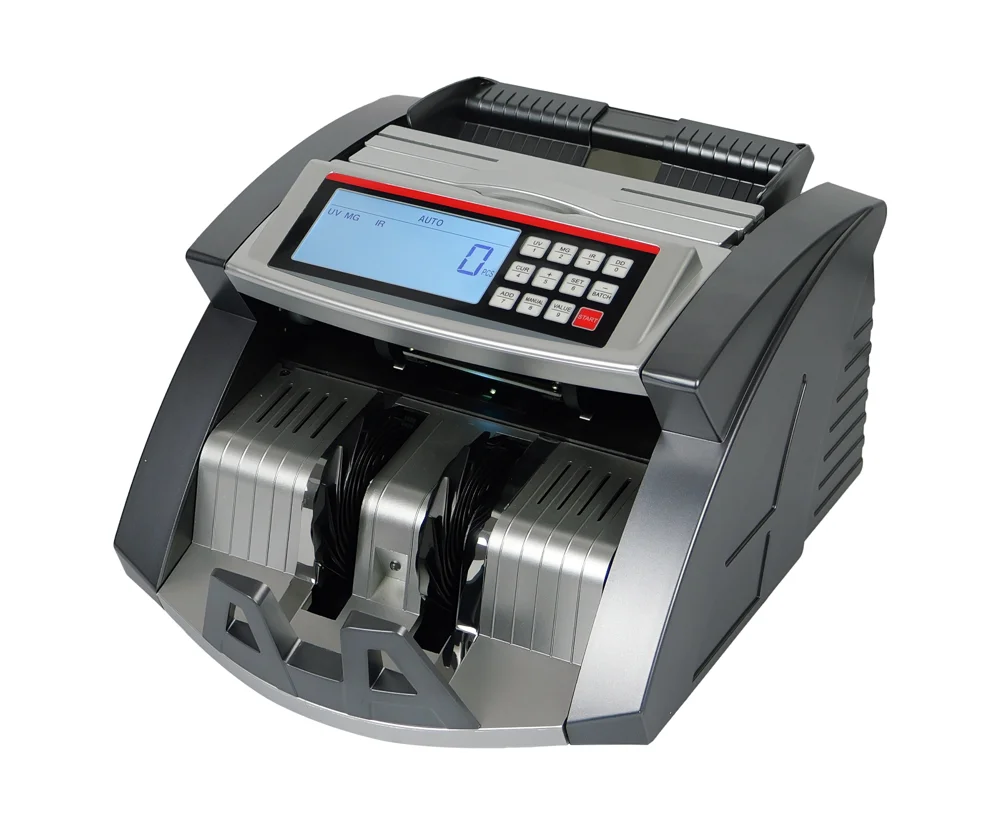
Specifications
- Colour: black, silver
- Counting speed: 1000 notes/min
- Hopper capacity: 300 banknotes
- Stacker capacity: 200 banknotes
- Countable banknote size: 50 × 110 mm – 90 × 180 mm
- Countable banknote thickness: 0.075 mm – 0.15 mm
- Functions: automatic start, stop and clear, batch, add and self-check function, LCD display turns red when a counterfeit banknote is detected, suitable for most world currencies
- Counterfeit detection: magnetic, ultraviolet, metal strip
- Error detection: double banknotes, half banknotes, chained banknotes
- Banknote count display: 4 digits
- Power consumption: ≤ 80 W
- Power supply: AC 220 V ±10%, 50 Hz
- Operating temperature: 0°C – 40°C
- Operating humidity: 25% – 80%
- Dimensions: 30 × 27 × 18 cm
- Package dimensions: 35.5 × 24 × 30 cm
- Weight: 5.25 kg
- Weight with packaging: 6.5 kg
Set contents
- Banknote counter
- External display
- Power cord
- Cleaning brush
- Fuse
- Conveyor belt
- Rubber roller
- User manual
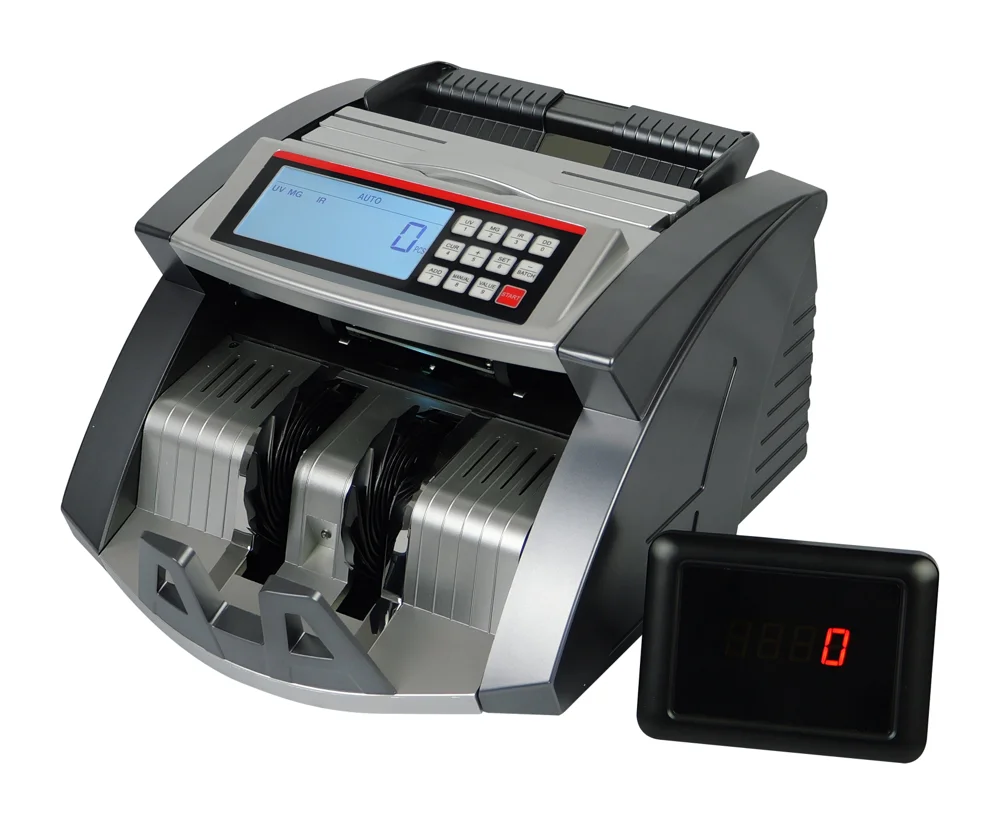
Safety notes
Always follow basic safety precautions when using the banknote counter to reduce the risk of fire, electric shock or injury.
- Do not use the counter where it may come into contact with water or other liquids.
- Disconnect the counter from the power supply before cleaning. Do not use petrol, solvents or other cleaning agents; clean it with a dry, soft cloth.
- To reduce the risk of electric shock, do not disassemble the counter. Repairs must be carried out by a qualified service technician.
- Do not touch any internal parts while the counter is running, to avoid injury or electric shock.
- When unplugging, do not pull the cable — hold the plug itself.
- Do not use the counter if the power cord is damaged or the outlet does not work properly.
- Do not place any objects on the cable.
- If the counter is not going to be used for a long time, unplug it from the power supply.
Start-up
Plug the power cord into the counter and into an outlet, then switch the counter on. The counter runs a self-test and the counting wheels rotate. When the test is complete, the main display shows "0".
To avoid false detection, check the banknotes before counting and remove:
- Banknotes repaired with paper
- Very dirty banknotes
- Washed banknotes
- Damaged banknotes
Feeding banknotes correctly
Arrange the banknotes neatly and place them between the banknote guides, as shown below.
Method 1:
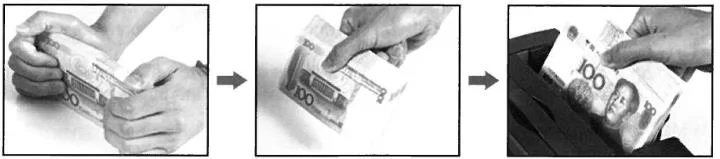
Method 2:
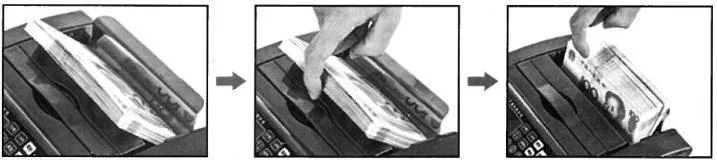
Control panel
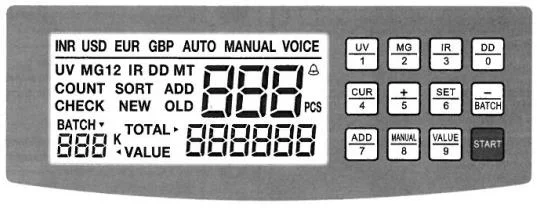
| Key | Function |
|---|---|
| UV | Switches UV detection on or off. |
| MG | Switches MG and MT detection on or off. The first press switches MT detection off, the second press switches MG detection off. |
| IR | Switches IR detection on or off. |
| DD | Switches DD detection on or off. |
| CUR | Selects the currency. |
| BATCH | Switches the batch function on or off. |
| ADD | Switches the add function on or off. |
| MANUAL | Selects manual or automatic counting mode. |
| VALUE | Selects the value calculation mode. |
| SET | Sets the sensor sensitivity. |
| + | In SET mode adds 1 (hold to increase continuously). In value calculation mode selects the denomination. |
| − | In SET mode subtracts 1 (hold to decrease continuously). In value calculation mode selects the denomination. |
| START | Clears the banknote count. |
Functions
Counting
When the banknotes are placed correctly on the hopper, the counter starts counting automatically. The number of counted banknotes is shown on the display.
UV (ultraviolet) detection
UV detection is switched on and off with the UV key and checks banknotes with UV security features. It is on by default after start-up. When the counter detects a counterfeit banknote, it stops counting, beeps and shows "A". Remove the suspicious banknote and press START to continue counting.
MG (magnetic) detection
MG detection is switched on and off with the MG key and checks banknotes with magnetic security features. It is on by default after start-up. When the counter detects a counterfeit banknote, it stops counting, beeps and shows "B". Remove the suspicious banknote and press START to continue counting.
MT (metal thread) detection
MT detection is switched on and off with the MG key and checks banknotes with a metal thread. It is on by default after start-up. When the counter detects a counterfeit banknote, it stops counting, beeps and shows "Y". Remove the suspicious banknote and press START to continue counting.
IR (infrared) detection
IR detection is switched on and off with the IR key and detects double banknotes. It is on by default after start-up. When the counter detects a double banknote, it stops counting, beeps and shows "C". Remove the banknote and press START to continue counting.
DD detection
DD detection is switched on and off with the DD key and detects banknotes of a different width. The counter memorises the width of the first banknote; when it detects a wider or narrower banknote (difference of more than 5 mm), it stops counting, beeps and shows "d". Remove the banknote and press START to continue counting.
Total value calculation
The value calculation is switched on and off with the VALUE key — hold VALUE for 2 seconds to activate it. Then press VALUE to select the denomination manually. For example, for Indian rupees:
- First press: 1K (1000 INR)
- Second press: 500 INR
- Third press: 100 INR
- Fourth press: 50 INR
- Fifth press: 20 INR
- Sixth press: 10 INR
Example: if you select 1000 INR and count 20 banknotes of 1000 INR, the display shows a total value of 20,000 INR. If you select 1000 INR, count only 1000 INR banknotes — banknotes of another denomination (e.g. 500 INR or 100 INR) are also counted as 1000 INR.
In manual counting mode you can switch on the ADD function to total several denominations, selecting each denomination with VALUE or + / −. The total value is then not cleared and new banknotes are added to those already counted.
Automatic or manual counting mode
- Automatic mode: the counter starts counting as soon as banknotes are placed on the hopper.
- Manual mode: place the banknotes on the hopper and press START to start counting.
Batch function
The batch function is switched on and off with the BATCH key. The set batch size is shown on the display:
| Press | Batch size |
|---|---|
| 1st | 100 |
| 2nd | 50 |
| 3rd | 20 |
| 4th | 10 |
| 5th | Batch function off |
You can set your own batch size with + or −; hold either key for about 2 seconds to change the value continuously. To switch the function off, press BATCH until the indicator disappears.
In batch mode the counter starts counting after the banknotes are loaded and stops when the count reaches the set value. To count the next batch, remove the counted banknotes from the stacker — the counter starts counting automatically. To continue without removing the banknotes, press START.
Add function
Press ADD (the indicator lights up) to switch the add function on. The next banknotes placed on the hopper are added to the previous count and the total is shown on the display. Press ADD again (the indicator goes off) to switch the function off.
Half banknote detection
Half banknote detection is on by default after start-up. When the counter detects half of a banknote, it stops counting, beeps and shows "F". Remove the banknote and press START to continue counting. The suspicious banknote is included in the count.
Chained banknote detection
Chained banknote detection is on by default after start-up. When the counter detects chained banknotes, it stops counting, beeps and shows "d". Remove the banknote and press START to continue counting. The suspicious banknote is included in the count.
Feeder adjustment
If counting is unstable or inaccurate, adjust the screw that sets the height of the hopper and the gap between the stop roller and the rubber roller. Put banknotes on the hopper and check that the counter runs smoothly.
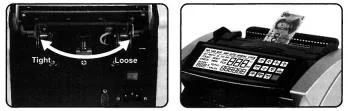
- Clockwise: reduces the gap and increases friction (tight).
- Anticlockwise: increases the gap and reduces friction (loose).
Error codes
The display shows error codes when there is a problem during counting.
| Code | Description | Solution |
|---|---|---|
| A | Counterfeit banknote detected by UV | Remove the banknote from the stack and press START to continue. |
| B | Counterfeit banknote detected by MG | Remove the banknote from the stack and press START to continue. |
| Y | Counterfeit banknote detected by MT | Remove the banknote from the stack and press START to continue. |
| C | Banknote detected by IR | Remove the banknote from the stack and press START to continue. |
| d | Chained banknotes or banknote of a different width | Remove the banknote from the stack and press START to continue. |
| F | Half banknote detected | Remove the banknote from the stack and press START to continue. |
| CE1 | UV sensor problem | Clean or replace the sensor. |
| CE2 | Code sensor or motor problem | Replace the sensor or the motor. |
| CE3 | Right counting sensor problem | Clean or replace the sensor. |
| CE4 | Left counting sensor problem | Clean or replace the sensor. |
| CE5 | Hopper sensor problem | Clean or replace the sensor. |
| CE6 | MG1 error | Clean or replace the sensor. |
| CE7 | MG sensor problem | Replace the MG sensor. |
| CE8 | Stacker sensor problem | Clean or replace the sensor. |
Most of these problems are caused by dust or dirt inside the counter — clean it regularly.
Troubleshooting
Switch the counter off and unplug it before any repair.
| Problem | Check |
|---|---|
| The counter does not work | Is the plug firmly in the outlet? Is the power supply or the fuse blown? |
| The counter does not start or stops by itself | Is the hopper sensor dusty? Clean it. Is the hopper sensor disconnected from the circuit? Check and connect it. Is the motor belt too loose or too tight? Adjust it. |
| Counting error | Is the hopper incorrectly positioned? Adjust it. Is the counting sensor dusty? Clean it. Are the rubbers and the feed wheel worn? Replace them. |
| False alarm | Is the UV (fluorescence) sensitivity set incorrectly? Adjust it. Is the sensor dusty? Clean it. Is the UV LED worn? Replace it. |
Machine settings
UV sensitivity
Hold SET for about 1.5 seconds — the display shows "A---". Press + or − to increase or decrease the value. A higher value means lower UV sensitivity; a lower value means higher UV sensitivity.
MG sensitivity
Hold SET for about 1.5 seconds — the display shows "A---". Then keep pressing SET until the parameter for the currency appears and adjust it with + or −:
| Display | Currency |
|---|---|
| b1-2 | INR |
| b2-2 | USD |
| b3-2 | EUR |
A higher value means lower MG sensitivity; a lower value means higher MG sensitivity.
When the settings are complete, put your finger on the hopper sensor or let the rollers run to save the settings.
Not stopping on counterfeit banknotes
Switch the counter on and press DD and BATCH at the same time — the display shows "H-C00". Press SET twice — the display shows "C02". Press −, select "1-0" and slide your finger over the hopper sensor. The rollers start, the setting is saved and counterfeit banknotes are not taken into account during counting.
Voice prompts on/off
- Method 1: press START/VOICE — "ON" on the display means voice prompts are on, "OFF" means they are off.
- Method 2: press and hold START/VOICE to switch voice prompts off.
Factory reset
Press DD and BATCH at the same time and hold them for about 2 seconds. "dEFAU" on the display confirms the reset to factory settings.
Maintenance
- Do not use the counter in places with high temperature or humidity — this may cause malfunctions or incorrect counting.
- Do not use the counter in direct sunlight.
- Do not use the counter where it may come into contact with water or other liquids.
- Clean the counter regularly, always after switching it off and unplugging it. Do not use chemicals or cleaning sprays; use a damp cloth.
- If the counter is not going to be used for a long time, unplug it from the outlet.
Frequently asked questions
How does the FiscalFlow-2010 detect counterfeit banknotes?
How many banknotes can the FiscalFlow-2010 count?
Can I count banknotes in fixed bundles?
Downloads
Original PDF manuals kept available as a legacy reference. Everything from them is already covered on this page — use the PDFs only if you need an offline copy.
- User Manual — English (PDF)
- Data sheet — English (PDF)
- Instrukcja obsługi — polska (PDF)
- Karta katalogowa — polska (PDF)
- Bedienungsanleitung — Deutsch (PDF)
- Datenblatt — Deutsch (PDF)
- Návod k obsluze — čeština (PDF)
- Návod na obsluhu — slovenčina (PDF)
- Használati útmutató — magyar (PDF)
- Інструкція з експлуатації — українська (PDF)