Long-range wireless 2D QR scanner with Zebra SE5500 engine, 2.4G radio, Bluetooth and docking station, HDWR HD4600-LR
GTIN: 5906935201299 · SKU: HD4600-LR
Table of contents
- Table of contents
- Specifications
- Set contents
- Features
- Configuration codes
- Master control codes
- Wireless settings
- Work and memory mode
- Sleep timer settings
- Keyboard language
- Beep settings
- Tone of beep
- Beep volume
- Beep duration
- Vibration settings
- Light signal settings
- Illumination settings
- Aiming settings
- Low power mode setting
- Decode timing settings
- Interface settings
- Case settings
- Output character set
- Control combination keys
- Transmission speed
- Prefix and suffix settings
- Hiding characters
- Output format
- 1D barcode scanning settings
- 2D code scan settings
- Check digit settings
- Appendix 1. Numeric codes
- Appendix 2. Hexadecimal codes
- Frequently asked questions
- Downloads
Specifications
- Sensor: CMOS
- Resolution: 2688 × 1520 px
- Scan engine: Zebra SE5500 (long-range)
- Light source: aimer, 520 nm green laser, 2 illuminating LEDs
- Scanning method: manual (push button)
- Scan confirmation: light, sound and vibration
- Scan angle: ±60° tilt, ±60° skew, 360° rotation
- Reading distance: up to 7 m
- Wireless communication: 2.4G radio, Bluetooth
- Wireless range: up to 100 m (2.4G), up to 10 m (Bluetooth)
- Print contrast: ≥30%
- Operating voltage: 3.3–4.2 V ±5%
- Maximum current: 480 mA
- Battery capacity: 2600 mAh
- Charging time: 4–6 h
- Interface: USB, Virtual COM
- Cable length: 1.2 m
- Ingress protection: IP67
- Operating temperature: −30 to 60 °C
- Storage temperature: −30 to 70 °C
- Operating humidity: 50–95%
- Docking station dimensions: 16.5 × 11 × 8.5 cm
- Device dimensions: 10 × 7 × 17 cm
- Package dimensions: 20 × 16 × 12 cm
- Device weight: 200 g
- Package weight: 500 g
- Readable 1D codes: Code 128, UCC/EAN-128, AIM 128, EAN-8, EAN-13, ISBN/ISSN, UPC-E, UPC-A, Interleaved 2 of 5, ITF-6, ITF-4, Matrix 2 of 5, Industrial 2 of 5, Standard 2 of 5, Code 39, Codabar, Code 93, Code 11
- Readable 2D codes: PDF417, QR Code (QR1/QR2, Micro QR), Data Matrix (ECC200, ECC000/050/080/100/140), Chinese Sensible Code, Aztec, UPCODE
Set contents
- HD4600-LR QR code reader
- Docking station
- USB cable for the docking station
- User manual
Features
- Long-range Zebra SE5500 engine: reads 1D and 2D codes (QR, Data Matrix, Aztec and more) from up to 7 m away — ideal for high-bay warehouses
- Reads from paper and screens: the CMOS engine handles labels as well as LCD, LED and OLED screens
- Two wireless modes: 2.4G radio through the docking station (up to 100 m) and Bluetooth (up to 10 m)
- Storage mode: collect codes offline in built-in memory and upload them to the computer later
- 26 keyboard layouts: match the output to your operating-system keyboard, including Polish
- Rugged IP67 housing: dust- and water-resistant, built for industrial use
- Light, sound and vibration feedback: clear confirmation of each successful scan
- Fully configurable: wireless mode, keyboard layout, beeper, light, illumination, aiming, power, prefix/suffix, interface, symbologies and check digits — all codes below
Configuration codes
To change scanner settings, scan the appropriate code below directly with the HD4600-LR. All codes come from the supplier manuals.
The HD4600-LR is built from two layers, so the codes come from two command families: the Zebra SE5500 decode engine (symbologies, check digits, beeper, illumination, aiming, interface, baud rate) and the NETUM radio module (wireless and Bluetooth, keyboard layout, sleep, memory/store mode, character set, radio-module prefix/suffix and character hiding). You can use them together.
💡 Tip: print this page ("Download this page as PDF" button above) to keep the codes at hand during configuration. Settings that ask you to enter a value are completed with the numeric codes in the appendices at the end of this page — Appendix 1 (decimal, for engine settings) and Appendix 2 (hexadecimal, for radio-module prefix/suffix and character hiding).
Master control codes
Factory reset:

Setting factory default settings:

Save current settings as default:

Get software version:

Restore factory defaults (radio module):

Get battery level:

Baud rate 19,200:

Reverting ENTER as an end character:

Saving settings:

Wireless settings
2.4G radio transmission:

Bluetooth transmission:

Bluetooth HID (default):

Bluetooth SPP:

Bluetooth BLE:

One-to-one pairing:

One-to-many pairing:

Deleting the pairing (un-pair):

iOS show/hide keyboard:

Bluetooth keyboard speed — high:

Bluetooth keyboard speed — medium (default):
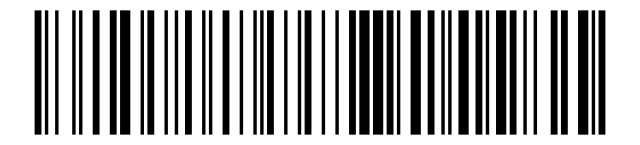
Bluetooth keyboard speed — low:
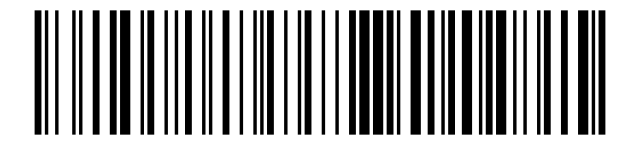
Work and memory mode
Normal mode (default):

Store mode (inventory):

Memory data upload:

Get stored barcode count:

Clear memory:

Auto store mode off (default):

Auto store mode on:

Sleep timer settings
Instant sleep:

Never sleep:

Sleep after 30 s:

Sleep after 1 min (default):

Sleep after 3 min:

Sleep after 5 min:

Sleep after 10 min:

Sleep after 30 min:

Module low-power mode enable:

Module low-power mode disable (default):

Keyboard language
USA / English (default):

United Kingdom:

France:

Belgium (French):

Canada (French):

Germany:

Switzerland (German):

Italy:

Spain:

Latin America (Spanish):

Portugal:

Brazil (Portuguese):

Netherlands:

Denmark:

Norway:

Finland:

Sweden:

Poland:

Czech Republic:

Slovakia:

Hungary:

Croatia:

Slovenia:

Serbia (Latin):

Turkey (Q):

Turkey (F):

Beep settings
Beep on (default) after successful read:

Beep after successful reading off:

Beep on startup (default):

Beep during startup off:

Mute:

Beep on:

Tone of beep
Low frequency:

Average frequency (default):

High frequency:

Beep volume
Low volume:

Medium volume:

High volume (default):

Beep duration
Short:

Medium (default):

Long:

Vibration settings
Vibration enabled (default):

Vibration disabled:

Light signal settings
Power off when LED is turned off:

LED on when power off:

LED light completely off:

Illumination settings
Internal illumination (default):

External illumination:

Internal and external illumination:

Decoding illumination enabled (default):

Decoding illumination disabled:

Image capture illumination enabled (default):

Image capture illumination disabled:

Aiming settings
Aiming pattern enabled (default):

Aiming pattern disabled:

Trigger mode — Level (default):

Presentation mode:

Auto-aim mode:

Auto-aim with illumination:

Low power mode setting
Continuous on (low power off):

Low power mode enabled (default):

Decode timing settings
Decode session timeout:

Timeout between scanning repeated code:

Time limit between scanning different codes:

Interface settings
HID keyboard:

Virtual COM:

Case settings
No case conversion:
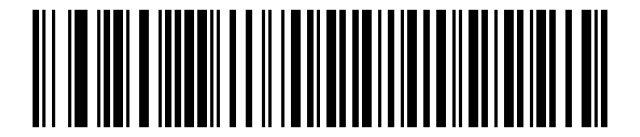
Capitalization:
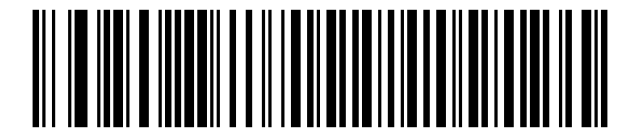
Lowercase:
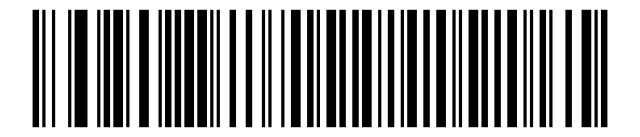
Swap case (A↔a):

Output character set
Normal (default):

GBK:

UTF-8:

Control combination keys
Ctrl combination keys on:

Ctrl combination keys off (default):

Transmission speed
Serial 9600 (default):

Serial 19200:

Serial 38400:

Serial 57600:

Serial 115200:

Serial 230400:

Serial 460800:

Serial 921600:

USB keyboard speed — high (default):

USB keyboard speed — medium:

USB keyboard speed — low:

USB HID multi-key on:

USB HID multi-key off (default):

Prefix and suffix settings
Prefix setting:

Setting 1 suffix:

2 suffix setting:

Add prefix:

Add suffix:

Clear all prefixes:

Clear all suffixes:

Hiding characters
Hide start characters:

Hide middle characters — start:

Hide middle characters — count:

Hide end characters:

Output format
Default output format:

Enable suffix output:

Enable prefix output:

Enable hiding start characters:

Enable hiding middle characters:

Enable hiding end characters:

1D barcode scanning settings
Code 39
Enabled:

Disabled:

Code 128
Enabled:

Disabled:

EAN-13 / JAN-13
Enabled:

Disabled:

EAN-8 / JAN-8
Enabled:

Disabled:

UPC-A
Enabled:

Disabled:

UPC-E
Enabled:

Disabled:

Interleaved 2 of 5
Enabled:

Disabled:

Code 93
Enabled:

Disabled:

Code 11
Enabled:

Disabled:

GS1 DataBar
Enabled:

Disabled:

Discrete 2 of 5 (DTF)
Enabled:

Disabled:

Codabar (NW-7)
Enabled:

Disabled:

MSI
Enabled:

Disabled:

Chinese 2 of 5
Enabled:

Disabled:

Matrix 2 of 5
Enabled:

Disabled:

US Postnet
Enabled:

Disabled:

US Planet
Enabled:

Disabled:

UK Postal
Enabled:

Disabled:

Japan Postal
Enabled:

Disabled:

Australia Post
Enabled:

Disabled:

GS1 DataBar Limited
Enabled:

Disabled:

Composite CC-C
Enabled:

Disabled:

Composite CC-A/B
Enabled:

Disabled:

2D code scan settings
QR Code
Enabled:

Disabled:

Data Matrix
Enabled:

Disabled:

PDF417
Enabled:

Disabled:

Aztec
Enabled:

Disabled:

MicroPDF417
Enabled:

Disabled:

Maxicode
Enabled:

Disabled:

Check digit settings
Transmit UPC-A check digit (default):

Do not transmit UPC-A check digit:

Transmit UPC-E check digit (default):

Do not transmit UPC-E check digit:

Enable Code 39 check digit verification:

Disable Code 39 check digit verification (default):

Transmit Code 39 check digit:

Do not transmit Code 39 check digit (default):

Transmit Interleaved 2 of 5 check digit:

Do not transmit Interleaved 2 of 5 check digit (default):

Transmit Code 11 check digit(s):

Do not transmit Code 11 check digit(s) (default):

One MSI check digit (default):

Two MSI check digits:

Transmit MSI check digit(s):

Do not transmit MSI check digit(s) (default):

Enable Matrix 2 of 5 check digit:

Disable Matrix 2 of 5 check digit (default):

Transmit Matrix 2 of 5 check digit:

Do not transmit Matrix 2 of 5 check digit (default):

Appendix 1. Numeric codes
Use these numeric codes to enter values required by engine settings above (for example the decode session timeout, or a Zebra-style prefix/suffix). Scan Cancellation to clear an entry and start again.
0:

1:

2:

3:

4:

5:

6:

7:

8:

9:

Cancellation:

Appendix 2. Hexadecimal codes
Use these hexadecimal codes (0–F) to enter values for the radio-module settings that ask for a two-digit hex value — adding a prefix/suffix (Add prefix / Add suffix) or hiding a number of characters (Hiding characters). Each character is entered as two hex digits according to the ASCII table.
0:

1:

2:

3:

4:

5:

6:

7:

8:

9:

A:

B:

C:

D:

E:

F:

Frequently asked questions
How far can the HD4600-LR read codes?
What is the wireless range?
Can it work without a permanent connection to the computer?
Can it read codes from screens?
Downloads
The original supplier PDF manuals are kept as archival documentation. Everything they contain is already on this page — use the PDF only if you need an offline copy.