Wired 1D laser barcode scanner, USB interface, HDWR HD67
GTIN: 5905669434096 · SKU: HD67
Table of contents
- Table of contents
- Specifications
- Set contents
- Features
- Configuration codes
- Restore factory defaults
- Trigger mode
- Buzzer
- End mark
- Capital and lowercase
- Reverse code reading (white on black background)
- Hide leading / trailing characters
- UPC-A
- UPC-E
- EAN-8
- EAN-13
- ISBN (EAN-13 → ISBN conversion)
- ISSN (EAN-13 → ISSN conversion)
- UPC / EAN extra code
- Code 39
- Code 32
- Code 128
- Code 93
- Code 11
- Codabar
- Industrial 2 of 5
- Interleaved 2 of 5
- MSI
- Keyboard layout
- Add prefix / suffix
- Common prefix / suffix examples
- Character codes (Appendix 1)
- Frequently asked questions
- Downloads
Specifications
- Construction material: ABS + PC
- Light source: 650–670 nm laser
- Scanning method: manual (push button)
- Scan confirmation: audible (two beep types) and visual (LED)
- Scanning speed: 100 scans per second
- Reading accuracy: 0.10 mm
- Reading distance: 2.5–600 mm
- Error rate: 1/8,000,000
- Print contrast: min. 30%
- Interface: USB
- Cable length: 200 cm
- Protection rating: IP54
- Device dimensions: 6.5 × 16 × 9 cm
- Package dimensions: 21 × 11.5 × 8.5 cm
- Device weight: 160 g
- Weight with packaging: 240 g
- Operating temperature: 0 to 45 °C
- Storage temperature: −40 to 60 °C
- Operating humidity: 5 to 95%
- Storage humidity: 5 to 95%
- Readable 1D codes: EAN-8, EAN-13, EAN-128, UPC-A, UPC-E, Code 128, Code 39, Code 93, Code 11, Industrial 2 of 5, Interleaved 2 of 5 (ITF), Matrix 2 of 5, Codabar, MSI
Set contents
- Wired HD67 barcode scanner with integrated USB cable
- User manual
Features
- Scanning: manual, triggered by the button on the scanner
- Type of barcodes scanned: 1D barcodes from paper labels
- Interface: USB (Plug & Play, HID keyboard emulation)
- Drop resistance: IP54 housing, durable ABS + PC construction
- Programmable prefix and suffix: any printable character or function key (F1–F12, navigation keys, …) configurable via the Barcode Table below
- Granular hide characters: hide 1 to 5 leading or trailing characters with single-scan codes
Configuration codes
To change scanner settings, scan the barcode below directly with the HD67.
💡 Tip: print this page ("Download this page as PDF" button above) to keep the codes at hand during configuration.
Restore factory defaults
Restore all device settings to default values:

Software version (output the firmware version on next scan):

Trigger mode
Keys trigger (default — scanning requires pressing the button):

Continuous mode (scanner reads continuously):

Automatic flash mode:

IR auto-induction on (detect codes approaching the scanner automatically):

IR auto-induction off:

Buzzer
Buzzer on (default):

Buzzer off:

Volume up (gradually increase the buzzer volume):

Volume down (gradually decrease the buzzer volume):

End mark
Character automatically appended after each scanned code.
CR (Carriage Return):

ENTER (CR + LF — start a new line of all barcodes):

TAB:

No end mark (cancel end mark):

Capital and lowercase
Do not swap (default — keep original case):

Convert to lowercase:

Convert to uppercase:

Swap capital ↔ lowercase:

Reverse code reading (white on black background)
Reverse code reading on:

Reverse code reading off (default):

Hide leading / trailing characters
The HD67 supports hiding 1 to 5 characters at the start or end of every scanned barcode with single-scan codes (no separate digit-entry workflow required).
Hide last 1 character:

Hide last 2 characters:

Hide last 3 characters:

Hide last 4 characters:

Hide last 5 characters:

Cancel hide-last (stop hiding trailing characters):

Hide first 1 character:

Hide first 2 characters:

Hide first 3 characters:

Hide first 4 characters:

Hide first 5 characters:

Cancel hide-first (stop hiding leading characters):

UPC-A
UPC-A on:

UPC-A off:

UPC-A check digit on:

UPC-A check digit off:

UPC-A system digit on:

UPC-A system digit off:

UPC-A → EAN-13 conversion on:

UPC-A → EAN-13 conversion off:

UPC-E
UPC-E on:

UPC-E off:

UPC-E check digit on:

UPC-E check digit off:

UPC-E system digit on:

UPC-E system digit off:

UPC-E → UPC-A conversion on:

UPC-E → UPC-A conversion off:

EAN-8
EAN-8 on:

EAN-8 off:

EAN-8 check digit on:

EAN-8 check digit off:

EAN-8 system digit on:

EAN-8 system digit off:

EAN-13
EAN-13 on:

EAN-13 off:

EAN-13 check digit on:

EAN-13 check digit off:

ISBN (EAN-13 → ISBN conversion)
EAN-13 → ISBN on:

EAN-13 → ISBN off:

ISSN (EAN-13 → ISSN conversion)
EAN-13 → ISSN on:

EAN-13 → ISSN off:

UPC / EAN extra code
2-digit extra code:

5-digit extra code:

2 or 5-digit extra code:

Extra code off:

Code 39
Code 39 on:

Code 39 off:

Transmit check character:

Do not transmit check character:

MOD43 verification on:

MOD43 verification off:

Full ASCII on:

Full ASCII off:

Code 32
Code 32 on:

Code 32 off:

Code 128
Code 128 on:

Code 128 off:

Code 93
Code 93 on:

Code 93 off:

MOD47 verification on:

MOD47 verification off:

Code 11
Code 11 on:

Code 11 off:

One check bit:

Two check bits:

Codabar
Codabar on:

Codabar off:

Output start & end digit on:

Output start & end digit off:

Industrial 2 of 5
Industrial 2 of 5 on:

Industrial 2 of 5 off:

Interleaved 2 of 5
Interleaved 2 of 5 on:

MSI
MSI on:

MSI off:

Keyboard layout
Set the scanner's keyboard layout to match the host operating system. Scan one of the codes below.
United States (English) — default:

Canada (French):

Netherlands (Dutch):

Spain (Spanish-International):

Argentina (Latin American):

Brazil (Portuguese):

Denmark (Danish):

United Kingdom (English):

Italy (Italian 142):

France (French):

Germany (German):

Norway (Northern Sami):

Sweden / Finland (Swedish, Finnish):

Slovakia (Slovak):

Portugal (Portuguese):

Czech Republic (Czech):

Belgium (Dutch):

Switzerland (German, French):

Turkish-F:

Turkish-Q:

Poland (Polish 214):

Croatia (Croatian):

Hungary (Hungarian):

Japan (Japanese):

Russia (Russian):

Arabic:

Add prefix / suffix
To add a prefix (or suffix) consisting of one or more characters before / after every scanned barcode, scan the codes in this order:
- Allow for prefix adding (or Allow for suffix adding)
- One or more character codes from the Character codes (Appendix 1) section below
- Exit add prefix and suffix mode to save the settings
To remove a previously configured prefix / suffix, scan Remove all prefix (or Remove all suffix).
Allow for prefix adding:

Allow for suffix adding:

Remove all prefix:

Remove all suffix:

Exit add prefix and suffix mode:

Common prefix / suffix examples
Ready-made code sequences for the symbols most often added as a prefix or suffix — previously provided as separate PDF sheets. Scan an example's codes one by one, from top to bottom.
# as a prefix:

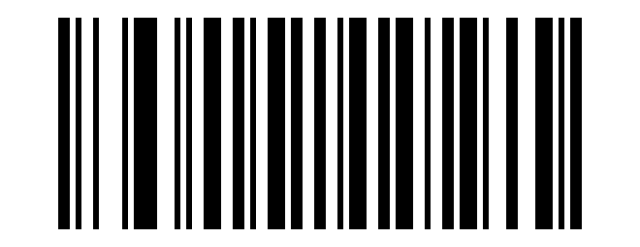

# as a suffix:

@ as a prefix:
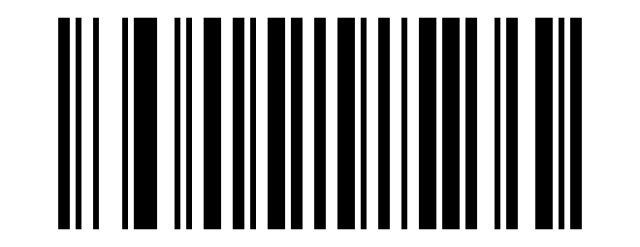
@ as a suffix:
~ as a prefix:

Space as a suffix:
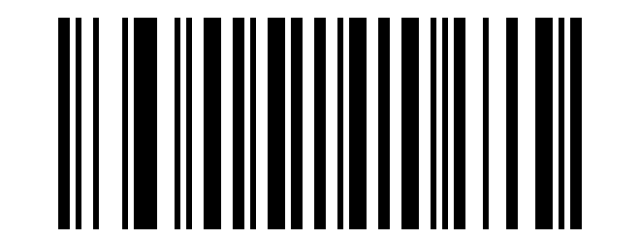
Character codes (Appendix 1)
Each code below represents a single character used to compose prefixes or suffixes. Scan them between the workflow markers described in the section above.
Show all 149 character codes (control codes, ASCII printable, function keys, navigation)
Control characters
SOH (0x01):

STX (0x02):

ETX (0x03):

EOT (0x04):

ENQ (0x05):

ACK (0x06):

BEL (0x07):

Backspace (0x08):

TAB (0x09):

LF (0x0A):

VT (0x0B):

FF (0x0C):

CR (0x0D):

SO (0x0E):

SI (0x0F):

DLE (0x10):

DC1 (0x11):

DC2 (0x12):

DC3 (0x13):

DC4 (0x14):

NAK (0x15):

SYN (0x16):

ETB (0x17):

CAN (0x18):

EM (0x19):

SUB (0x1A):

ESC (0x1B):

FS (0x1C):

GS (0x1D):

RS (0x1E):

US (0x1F):

Printable ASCII
Space:

!:

":

#:

$:

%:

&:

':

(:

):

*:

+:

,:

-:

.:

/:

0:

1:

2:

3:

4:

5:

6:

7:

8:

9:

::

;:

<:

=:

>:

?:

@:

A:

B:

C:

D:

E:

F:

G:

H:

I:

J:

K:

L:

M:

N:

O:

P:

Q:

R:

S:

T:

U:

V:

W:

X:

Y:

Z:

[:

\:

]:

^:

_:

`:

a:

b:

c:

d:

e:

f:

g:

h:

i:

j:

k:

l:

m:

n:

o:

p:

q:

r:

s:

t:

u:

v:

w:

x:

y:

z:

{:

|:

}:

~:

Delete (0x7F):

Function keys
F1:

F2:

F3:

F4:

F5:

F6:

F7:

F8:

F9:

F10:

F11:

F12:

Navigation keys
Insert:

Home:

Page Up:

Delete (key):

End:

Page Down:

Arrow Right:

Arrow Left:

Arrow Down:

Arrow Up:

Frequently asked questions
Can I add a prefix or suffix to scanned data?
Is the HD67 compatible with cash registers and POS software?
What should I do if the scanner does not emit a laser beam?
How durable is the HD67 housing?
Downloads
Original manufacturer PDF manuals kept available as a legacy reference. Everything from them is already covered on this page — use the PDFs only if you need an offline copy.