Longitudinal metal cash box with silver cover, organizer, key lock and electronic RJ12 opening, securePRO-460S
GTIN: 5906935202838 · SKU: securePRO-460S
Table of contents
Specifications
- Colour: black with a silver top cover
- Exterior material: thick cold-rolled steel and SECC
- Surface finish: textured hybrid powder coating
- Number of compartments: 8 banknote compartments with snaps, 8 coin compartments
- Banknote compartment dimensions: 17.1 cm wide × 8.25 cm high
- Lock: two-position (manual opening, electronic opening)
- Additional functions: removable insert with separately removable banknote compartments and individually removable coin containers; an additional slot on the front
- Interface: RJ12
- Lifetime: up to 1,000,000 operating cycles
- External dimensions: 46 (W) × 17 (L) × 10 (H) cm
- Package dimensions: 50.5 × 22 × 15.8 cm
- Product weight: 6.24 kg
- Weight with packaging: 6.77 kg
Kit contents
- securePRO-460S cash box
- RJ12 cable
- Two keys to the lock
- User manual
Features
- Longitudinal cash box with a silver top-opening lid — a wide, low metal box with a brushed silver cover over a black body; lift the lid to reach the organizer inside. Its shallow, elongated shape fits narrow counters where a tall box would not.
- Coin and banknote organizer — a removable insert with 8 banknote compartments (with snaps) and 8 coin compartments; the banknote compartments come out separately and the single-coin containers are individually removable, and there is an additional slot on the front for cheques and other means of payment.
- Two ways to open — by hand with the key, or electronically once it is connected to a fiscal cash register or POS.
- Solid steel build — thick cold-rolled steel and SECC with a textured hybrid powder coating; a 6.24 kg construction that resists mechanical damage and tampering.
- Up to 1,000,000 cycles — the lock mechanism is rated for up to one million operating cycles.
Connecting for electronic opening
To open the cash box electronically, connect it to a fiscal cash register, a POS terminal or a computer with the supplied RJ12 cable. When the receipt finishes printing, the cash register sends a pulse and the box opens automatically. Electronic opening is optional — the box always works as a stand-alone, key-opened cash box as well.
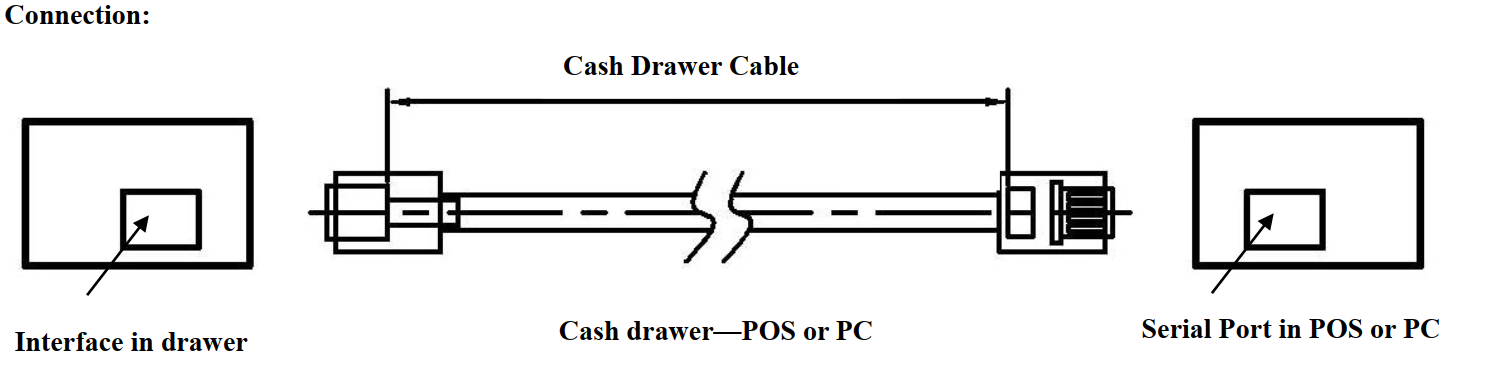
Opening the cash box
The securePRO-460S opens in two ways — manually with the key, or electronically once it is connected to a fiscal cash register. The manual key position is always available, even when the box is not connected to a powered device.
It ships with a two-position key lock; some units are supplied with a three-position lock instead.
Two-position lock
- Manual open — turning the key to the manual position opens the box.
- Electronic (online) open — in the middle position the box is controlled by the connected cash register or POS and opens automatically on the print pulse.
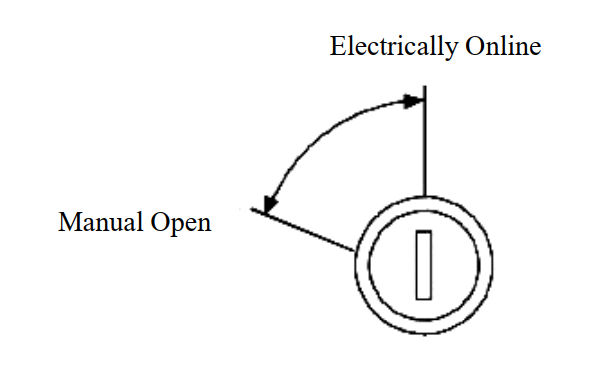
Three-position lock
- Manual open — turning the key to the top position opens the box.
- Electronic (online) open — the middle position lets the connected cash register or POS control the box.
- Locked — the bottom position keeps the box locked until the key is turned.
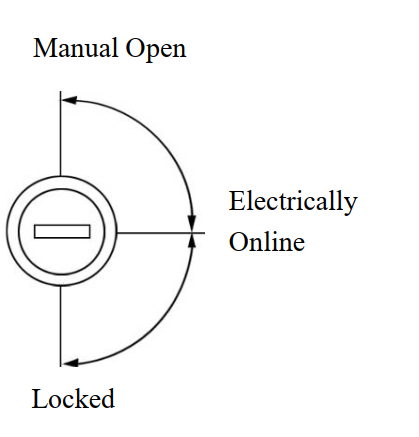
To reduce the risk of damaging or breaking the key, avoid leaving it in the lock during normal operation.
Maintenance
The moving parts of the cash box should be cleaned and lubricated periodically. The frequency depends on usage and environment, but the typical recommended interval is every three months.
- Using a dry, lint-free cloth, wipe off old grease and debris from the inner and outer guides. Do not use water or any liquid cleaners.
- With a clean applicator, apply a thin layer of lithium-based bearing grease to the guides.
- Work the mechanism back and forth several times to coat the polyurethane rollers properly and distribute the grease evenly.
Frequently asked questions
How do I open the securePRO-460S?
How is the securePRO-460S different from the securePRO-460?
What do the lock positions mean?
How much can the securePRO-460S hold?
Which devices is the securePRO-460S compatible with for electronic opening?
Downloads
Original manufacturer PDF manuals kept available as a legacy reference. Everything from them is already covered on this page — use the PDFs only if you need an offline copy.