LED desk lamp with folding side panels, LumixDesk-03
GTIN: 5907614668969 · SKU: LumixDesk-03
The LumixDesk-03 is an LED desk lamp with a 1380 lumen main light, clamped to the edge of the desk on an articulated arm. Two side panels fold out from the main bar, widening the lit area to 71 cm. A touch panel sets five levels of brightness and five levels of colour temperature between 3000 K and 6000 K, both also adjustable steplessly by holding the button, and a built-in light sensor adjusts the brightness to the light in the room.
Table of contents
Specifications
- Colour: black, powder coated
- Material: PC, ABS, aluminium alloy, iron
- Luminous flux: 1380 lumens
- Colour temperature: 3000 K–6000 K ±275 K
- Lamp life: 40,000 hours
- Light source: LED
- Additional functions: brightness adjustment, colour temperature adjustment
- Mounting method: clamping screw
- Power supply: 100–240 V, 50/60 Hz, 0.8 A
- Power: 24 W
- Cable length: 2 m
- Ingress protection: IP20
- Operating temperature: −20 °C to +45 °C
- Operating humidity: 0% to 85%
- Product dimensions: 71 × 95 cm
- Package dimensions: 45 × 16.5 × 9.5 cm
- Product weight: 1.1 kg
- Weight with packaging: 1.3 kg
Kit contents
- LumixDesk-03 lamp
- AC adapter
Features
- Light source (DIN): LED
- Brightness: 1380 lumens
- Lamp life: up to 40,000 hours
- Functions: brightness adjustment, colour temperature adjustment
Installation guide
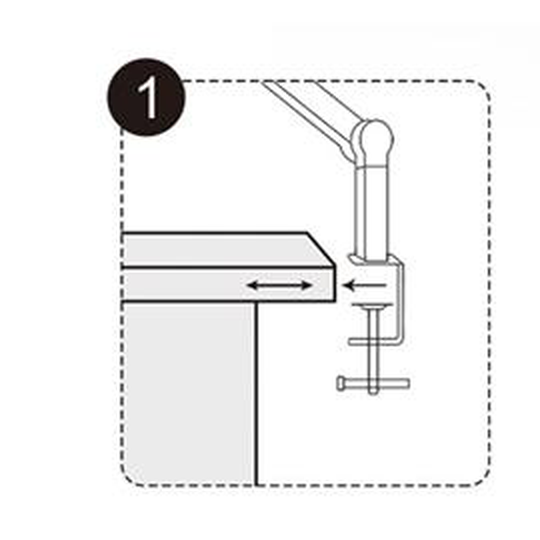
Step 1 — Position the clamp
Put the clamp of the lamp on the edge of the desk, in the place where the lamp is to stand.
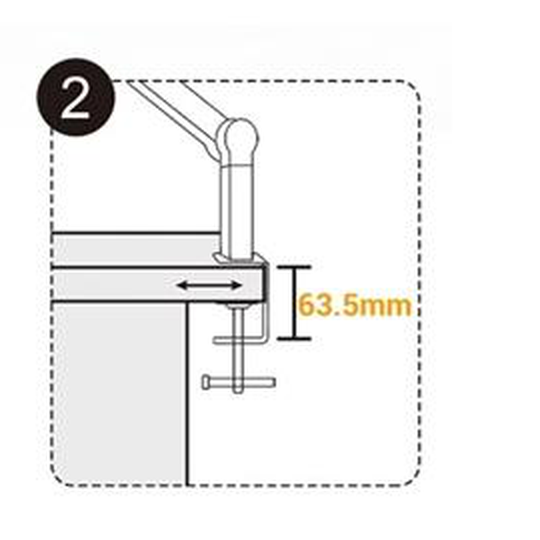
Step 2 — Tighten the clamping screw
Press the clamp against the edge of the desk and tighten the screw firmly. The desktop should be no thicker than 63.5 mm.
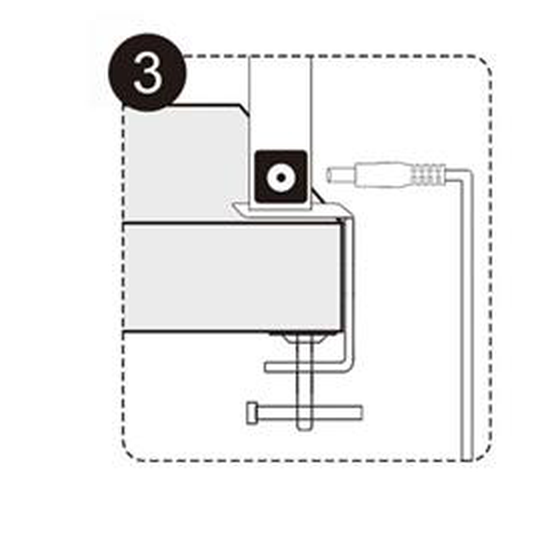
Step 3 — Connect the adapter to the lamp
Plug the connector of the supplied adapter into the socket of the desk lamp.
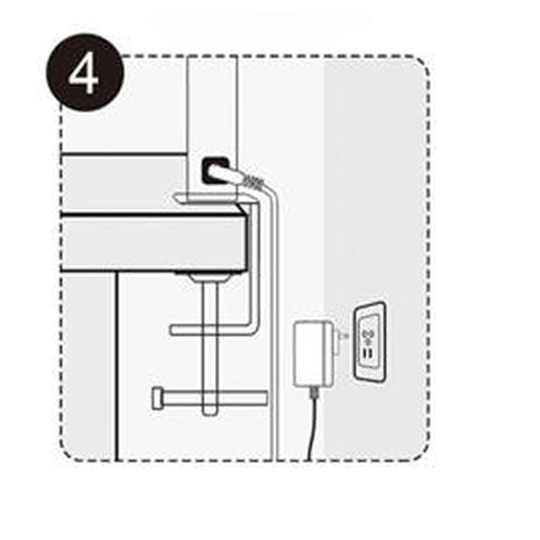
Step 4 — Plug in the power supply
Plug the AC adapter into the mains socket.
Touch control panel
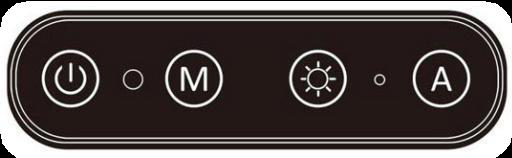
| Button | Function |
|---|---|
 | Click: turns the main light in the middle on and off. |
 | Ambient light sensor: the sensor receives the ambient light and converts it into an electrical signal. |
 | Click: five levels of colour temperature (3000 K – 3500 K – 4000 K – 5000 K – 6500 K). Press and hold: stepless colour temperature adjustment (3000–6500 K). |
 | Click: five levels of brightness (20% – 40% – 60% – 80% – 100%). Press and hold: stepless dimming (20%–100%). |
 | Automatic light sensing indicator: when the automatic light sensing function is on, the blue indicator is lit; when it is off, the blue light is out. |
 | Click: turns the auxiliary lights on both sides on and off. Press and hold: the light sensor measures the surrounding light intensity and adjusts the brightness automatically. |
Energy label and product information sheet
The LumixDesk-03 is registered in the European product database for energy labelling (EPREL) under number 2311914.
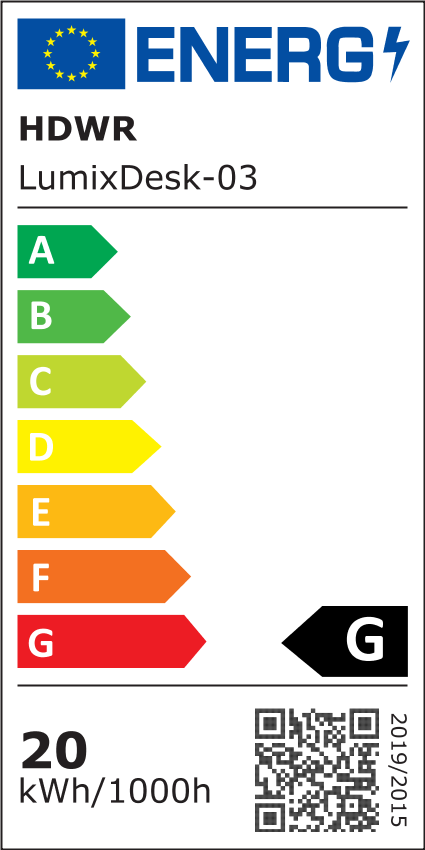

- Energy efficiency class: G
- Energy consumption: 20 kWh/1000 h
- Useful luminous flux (φuse): 1380 lm in a narrow cone (90°)
- Correlated colour temperature: 3000–6000 K
- On-mode power (Pon): 19.5 W
- Standby power (Psb): 0.50 W
- Colour rendering index (CRI): 90
- R9 colour rendering value: 65
- Peak luminous intensity: 770 cd, beam angle 84°
- Chromaticity coordinates (x, y): 0.370, 0.370
- Colour consistency: 5 McAdam ellipses
- Flicker metric (PstLM): 1.0 · stroboscopic effect metric (SVM): 0.4
- Lumen maintenance factor: 0.80 · survival factor: 1.00
- Dimensions without control gear (H × W × D): 956 × 717 × 55 mm
Documents:
- Energy label (PDF)
- QR code for the EPREL entry (PDF)
- Product information sheet: English · polski · Deutsch · français · español · čeština · Nederlands · ελληνικά · italiano · slovenščina · svenska · română · lietuvių
Safety notes
- Keep the lamp away from heat sources.
- Do not immerse the appliance, the cables or the plugs in water or any other liquid, to avoid electric shock.
- Do not look directly at the LEDs, to avoid damaging your eyes.
- Do not pull the power plug out with wet hands, as this may cause electric shock.
- Any repair of the appliance should be carried out by a qualified service technician.
- Under no circumstances may this appliance be modified.
Frequently asked questions
What colour temperature range does the LumixDesk-03 offer?
How is the LumixDesk-03 mounted on a desk?
What power supply does the LumixDesk-03 require?
How does the automatic light sensing work?
Can the brightness be set to anything other than the five levels?
Downloads
The manufacturer's manuals and datasheets in PDF, in case an offline copy is needed. Everything in them is on this page as well.