Steel electronic safe with PIN code and key lock, SecureBox-30
GTIN: 5906935202173 · SKU: SecureBox-30
Table of contents
Specifications
- Colour: beige
- Material: powder-coated steel
- Material thickness: 2 mm (door), 4 mm (housing)
- Capacity: 8.5 l
- Power supply: 4 × AA 1.5 V
- Opening system: mechanical key lock and electronic code lock
- External dimensions: 31 (W) × 20 (L) × 20 (H) cm
- Package dimensions: 36 × 25 × 25 cm
- Product weight: 4.2 kg
- Weight with packaging: 4.5 kg
Kit contents
- SecureBox-30 safe
- Two keys
- Two mounting screws
- User manual
Opening the safe for the first time
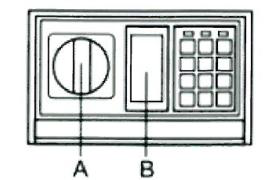
To open the safe for the first time, remove the plastic cover ("B") from the front panel, insert the key into the lock and turn it to the left (counterclockwise). At the same time, turn the knob ("A") clockwise to open the safe.
Battery installation
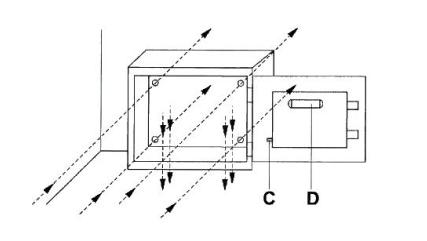
The safe requires 4 "AA" (1.5 V) batteries. Open the safe, remove the battery cover ("D") on the back of the door and insert the batteries, observing the correct polarity. Alkaline batteries are recommended.
Programming the code
- With the safe door open, press the red "C" button on the back of the door, close to the hinge. Release the button — you will hear two beeps and the yellow LED will light up.
- Within 15 seconds, enter a new code of 3 to 8 digits, then confirm by pressing the letter "B". The safe beeps twice and the yellow LED turns off — your code has been programmed.
- Write down the new code and verify that it is stored correctly by opening and closing the safe door.
Choose a code that is not a birthday, anniversary or a sequence of repeated/sequential digits. Keep a written copy of the code in a separate, secure location.
Using the safe
To open the safe, enter your code and then press the letter "B". After the beep sounds and the green LED lights up, turn the knob clockwise to open the door within 5 seconds.
If you enter the wrong code three times in a row, the safe locks — wait 20 seconds before trying again.
Low-battery warning
If the batteries run low, the red LED (in the centre of the keypad) informs you immediately. To check the battery status, simply enter your code and try to open the safe: if the batteries are weak the red LED lights up; if nothing happens, the batteries are fine.
Replacing the batteries
The safe requires 4 "AA" (1.5 V) batteries. Open the safe, remove the battery cover ("D") on the back of the door and replace the 4 used batteries with new ones. After replacing the batteries you must reprogram the code as described in step 3 above. Alkaline batteries are recommended.
Emergency (manual) opening
For your convenience the safe is fitted with a manual opening system. If you forget or lose your code, remove the plastic cover ("B") from the front panel, insert the key into the lock and turn it to the left (counterclockwise). Then turn the knob ("A") clockwise to open the safe manually at any time.
Keep the emergency keys in a safe place away from the safe itself — never leave them inside or on top of it. If both keys are lost, opening the safe requires a locksmith.
Anchoring the safe
To minimise the risk of the safe being stolen, it can be fastened to the floor, a wall or a cabinet. The safe has mounting holes (8 mm diameter) on the back and on the bottom, allowing it to be permanently fixed with wall plugs.
The safe should be kept in an upright position during installation.
Safety
- The safe is intended for storing money, documents and small valuables. Do not store items that could damage the lock mechanism.
- The product is not waterproof or fireproof. Avoid contact with water, other liquids and excessive moisture.
- Place the safe in a stable, dry location, ideally anchored in a corner and bolted to two surfaces.
- If you have trouble opening the safe, do not use force — contact authorised technical service.
- Always change the factory code on first use and replace the batteries as soon as the low-battery LED appears.
Frequently asked questions
How do I open the SecureBox-30 for the first time?
How do I set or change the PIN code on the SecureBox-30?
What do I do if I forget the code or the batteries are dead?
How will I know when the batteries need replacing?
How do I anchor the SecureBox-30?
Is the SecureBox-30 fireproof or waterproof?
Downloads
Original manufacturer PDF manuals kept available as a legacy reference. Everything from them is already covered on this page — use the PDFs only if you need an offline copy.