Precision laboratory scale up to 500 g, wagPRO-A500G
GTIN: 5907614664787 · SKU: wagPRO-A500G
Table of contents
Specifications
- Material: stainless steel, plastic
- Maximum nominal load: 500 g
- Accuracy: 0.01 g
- Maximum permissible load: 100% of the nominal load
- Overload: 150% of the full capacity
- Legal-for-trade verification: no
- Display: LCD, up to 6 digits
- Available weighing units: g, ct, oz
- Additional functions: tare and zeroing, unit switching, piece counting, calibration, automatic power-off
- Power supply: built-in rechargeable battery and mains adapter
- Battery capacity: 1.3 Ah
- Power requirement: DC 9 V / 200 mA
- Automatic power-off: yes
- Device dimensions: 19 (W) × 24 (D) × 10 (H) cm
Kit contents
- wagPRO-A500G laboratory scale
- Plastic draught shield
- Mains adapter
- User manual
Panel
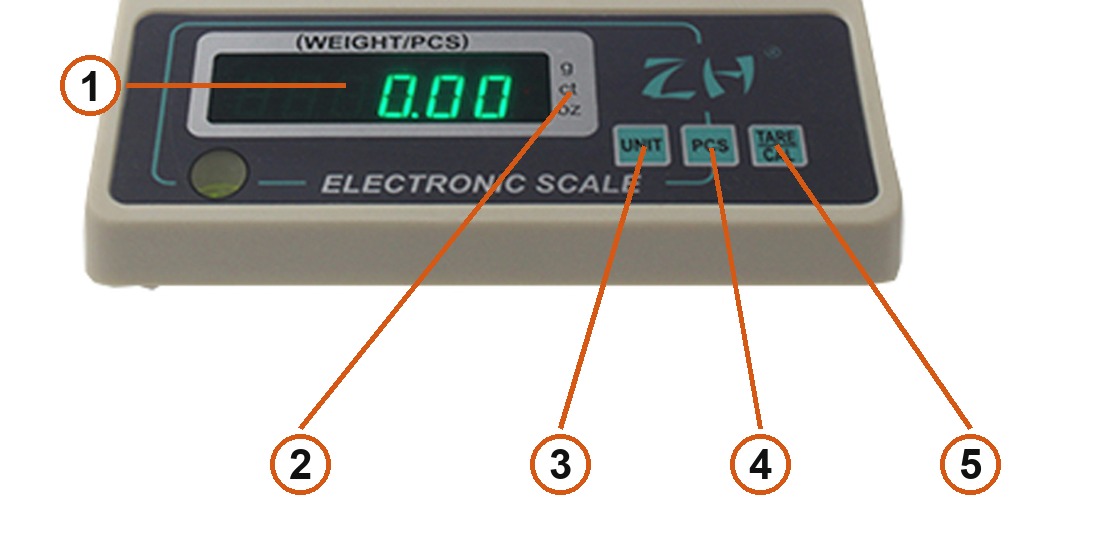
- LCD display — up to 6 digits, labelled
(WEIGHT/PCS): it shows either the weight or the piece count. - Unit indicators — g, ct and oz; the lit one is the active weighing unit.
- UNIT — switches the weighing unit and moves between values while setting the sample size.
- PCS — switches to piece counting.
- TARE/CAL — tares and zeroes with a short press; held for 3 seconds it starts calibration or the sample-size setting.
Using the scale
Setting up
Place the scale on a stable, level surface away from draughts and vibration, and fit the plastic draught shield over the pan. The shield keeps air movement off the pan — at 0.01 g resolution even a passing draught shifts the reading.
Charge the built-in battery fully before the first weighing, or run the scale from the supplied mains adapter (DC 9 V / 200 mA).
Zeroing and taring
Press TARE/CAL briefly. The scale subtracts whatever is currently on the pan and shows 0.00, so you can weigh the contents of a container without its weight.
Switching the unit
Press UNIT to move to the next weighing unit. The scale offers grams (g), carats (ct) and ounces (oz) — the active one is marked by the indicator beside the digits.
Piece counting
- Press PCS to enter counting mode.
- Hold TARE/CAL for 3 seconds — the display shows the sample size, starting at
S=5. - Press UNIT to choose the sample: 5, 10, 20, 50, 100, 200 or 500 pieces.
- Confirm with TARE/CAL, then put exactly that many identical items on the pan.
- The scale works out the weight of a single piece; load any quantity of the same item and the display shows how many pieces it is. Press UNIT to leave counting.
Calibration
Hold TARE/CAL for 3 seconds while weighing. The display shows the reference weight the scale expects — place that calibration weight on the pan, and once the value is accepted the scale returns to weighing.
Pressing all three keys at once puts the scale into initialisation mode, and UNIT on its own can open the factory test mode. Both are service functions — leaving them by mistake can cost you the calibration, so use them only when you intend to.
Overload
Never exceed the rated capacity. The scale tolerates up to 150% of the full capacity, but weighing above the 500 g range distorts the readings and can permanently damage the load cell.
Care and storage
- Keep the scale in a dry room. Avoid water, damp and extreme temperatures.
- Wipe the housing and the pan with a soft, dry cloth; never use aggressive cleaning agents.
- Place items on the pan gently — dropping a load damages a precision mechanism.
- Do not use the scale with a flat battery. If the display stops responding, recharge it.
- Switch the scale off if it will not be used for a long time and store it in a dry, cool place away from heat sources.
Frequently asked questions
What is the wagPRO-A500G weighing range and accuracy?
What is the plastic cover for?
Which weighing units does the scale support?
How do I count pieces instead of weighing them?
How do I calibrate the scale?
Can the scale run without mains power?
Downloads
Original manufacturer PDF manuals kept available as a legacy reference. Everything from them is already covered on this page — use the PDFs only if you need an offline copy.