Wireless hook scale up to 1000 kg, wagPRO-H1000P
GTIN: 5907614662127 · SKU: wagPRO-H1000P
Table of contents
Specifications
- Material: steel
- Maximum nominal load: 1000 kg
- Accuracy: 500 g
- Maximum permissible load: 100% of nominal load
- Maximum safety load: 120% of nominal load
- Legal-for-trade verification: no
- Display: digital LCD
- Display backlight: blue
- Additional functions: display hold, tare, unit switching
- Available weighing units: kg, lb
- Battery type: lithium-ion
- Power supply: mains and built-in battery
- Battery capacity: 2400 mAh
- Battery life: up to 4 days
- Standby time: up to 2 weeks
- Operating temperature: −10 to 40 °C
- Operating humidity: up to 90% at 20 °C
- Device dimensions: 26 × 14 × 5 cm
- Package dimensions: 27.5 × 18 × 10 cm
- Device weight: 1.1 kg
- Weight with packaging: 1.3 kg
Kit contents
- Hook scale
- Hook fitting with a safety latch and a mounting pin
- Mains adapter
- Remote control
- User manual
Control panel
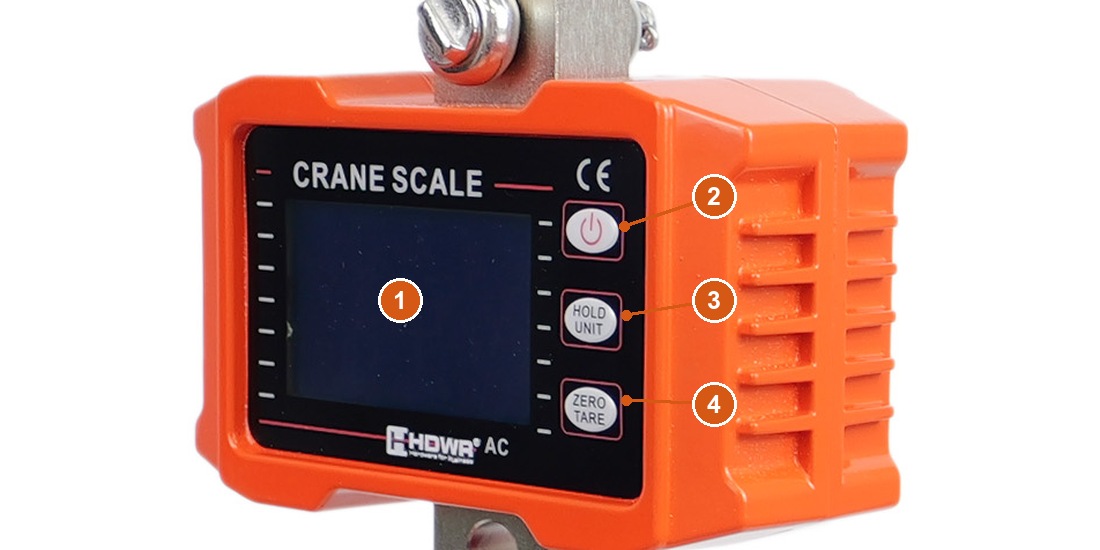
- LCD display with a blue backlight — shows the weight, the active unit and the status indicators.
- Power button — switches the scale on and off.
- HOLD / UNIT — locks the reading; held down, it changes the weighing unit.
- TARE / ZERO — tares the scale and returns the reading to zero.
All three buttons sit in a column to the right of the display.
Display indicators
Small letters along the display tell you what state the scale is in:
| Indicator | Meaning |
|---|---|
| S | The reading is stable |
| Z | The reading is zero |
| T | Tare is active |
| H | The reading is locked (hold) |
| KG | Kilograms are the active unit |
| LB | Pounds are the active unit |
Using the scale
Switching on
Hold down the power button for 3 seconds. Wait for the S indicator before you read the weight — it confirms that the reading has settled.
Zeroing and tare
If the display shows anything other than 0.0 with nothing on the hook, press TARE / ZERO to bring it back to zero.
To weigh goods without the weight of a sling, crate or pallet:
- Hang the empty container on the hook and press TARE / ZERO. The T indicator appears and the display shows
0.0. - Load the goods — the display now shows their net weight.
Holding the reading
Suspended loads swing, and the display is often far from where you stand. Press HOLD / UNIT to freeze the current reading — the letter H appears at the bottom of the screen. Press HOLD / UNIT again to release the display and return to live weighing.
Switching between kilograms and pounds
Hold HOLD / UNIT for 1 second to change the unit. KG on the display means kilograms, LB means pounds.
Charging
The scale runs on a built-in lithium-ion battery and charges from the supplied mains adapter. A full charge covers up to 4 days of intensive weighing, or up to 2 weeks in standby. You can weigh while the adapter is connected.
Remote control
The remote supplied with the scale lets you operate it from a distance — useful when the load hangs high or when standing under it would be unsafe.
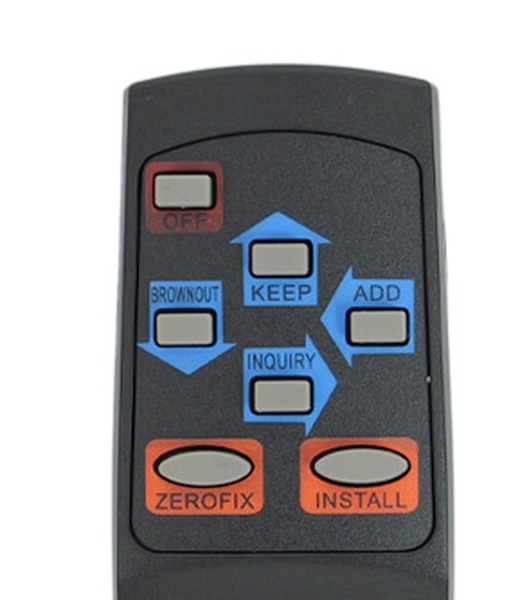
The keys on the remote are labelled with their functions:
| Key | Function |
|---|---|
| OFF | Switches the scale off |
| KEEP | Short press — locks the reading. Held for 3 seconds — changes the weighing unit |
| ZEROFIX | Tares the scale |
| BROWNOUT | Changes the backlight mode |
| ADD | Adds up several weighings |
| INQUIRY | Recalls the last 10 weighings |
The manufacturer's manual labels the remote keys A–D and does not describe ADD, INQUIRY or INSTALL. What those three do is taken from the sister model wagPRO-H1500, which uses the same remote.
Backlight modes
Pressing BROWNOUT cycles through three settings, shown on the display:
| Display | Behaviour |
|---|---|
d — AUT | The backlight switches off automatically after a few seconds |
d — OFF | The backlight stays off |
d — ON | The backlight stays on all the time |
Safety
- Never exceed the rated load of 1000 kg. The safety limit of 120% is a margin against damage, not a working range.
- Check the hook and the safety latch before each lift, and make sure the load cannot slip off.
- Do not stand under a suspended load. Use the remote to read the weight from a safe position.
- Let the load stop swinging before you take the reading — a moving load stresses the mechanism and the indication will not settle.
- Keep the scale away from prolonged rain, high humidity and strong impacts.
- Disconnect the adapter before cleaning and wipe the housing with a damp cloth. Do not pour water over the scale.
- Charge the battery with the supplied adapter only.
Frequently asked questions
Is the wagPRO-H1000P certified for commercial trade?
How long does the rechargeable battery last?
What weight units can the scale display?
How far does the wireless remote work?
How do I weigh goods without the weight of the container?
The load keeps swinging and I cannot read the weight. What can I do?
Can the backlight be switched off?
Can I use the scale while it is charging?
Files to download
The manual and the datasheet in PDF, in case you need an offline copy. Everything they contain is also on this page.
- wagPRO-H1000P user manual — English (PDF)
- wagPRO-H1000P datasheet — English (PDF)
- wagPRO-H1000P user manual — Polish (PDF)
- wagPRO-H1000P datasheet — Polish (PDF)
- wagPRO-H1000P user manual — German (PDF)
- wagPRO-H1000P datasheet — German (PDF)
- wagPRO-H1000P user manual — Romanian (PDF)
- wagPRO-H1000P datasheet — Romanian (PDF)