Hook scale up to 1500 kg with remote control, wagPRO-H1500
GTIN: 5907614667221 · SKU: wagPRO-H1500
Table of contents
Specifications
- Material: steel
- Maximum nominal load: 1500 kg
- Accuracy: 200 g
- Maximum permissible load: 100% of nominal load
- Maximum safety load: 125% of nominal load
- Legal-for-trade verification: no
- Display: digital LCD with backlight
- Additional functions: display hold, tare, unit switching, low battery indicator, overload indicator
- Available weighing units: kg, lb, N
- Wireless range: up to 20 metres
- Power supply: 4 × 1.5 V AA battery
- Operating temperature: −10 to 40 °C
- Operating humidity: up to 90% at 20 °C
- Device dimensions: 27.5 × 14.5 × 7 cm
- Package dimensions: 28.5 × 17.5 × 10 cm
- Device weight: 1.3 kg
- Weight with packaging: 1.7 kg
Kit contents
- Hook scale
- Remote control
- Batteries for the scale and the remote
- User manual
Control panel
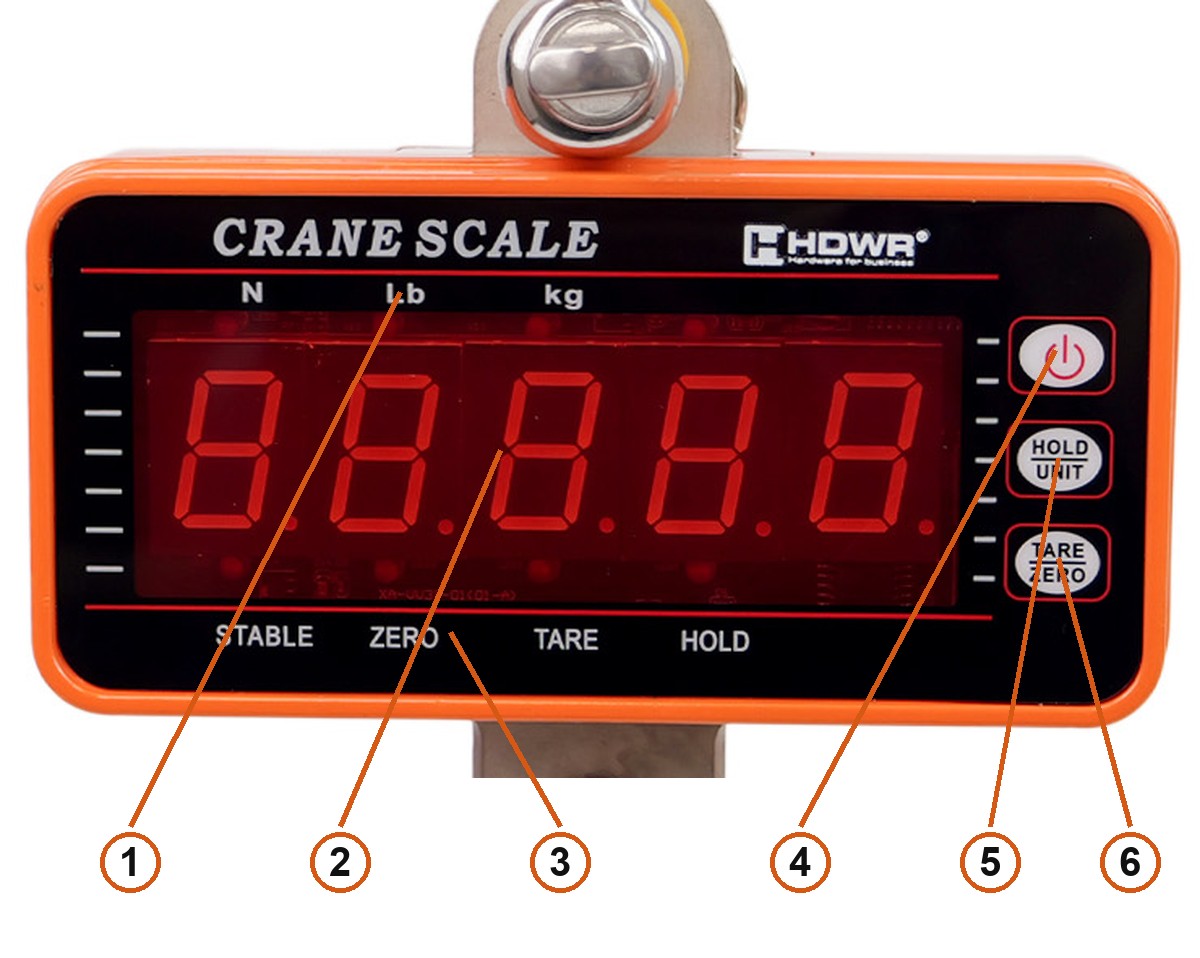
- Unit indicators —
N,Lbandkgabove the display; the active one lights up. - Display — 5 digits, red, with a backlight.
- Status indicators —
STABLE,ZERO,TAREandHOLDbelow the display. - Power key — switches the scale on and off with a short press.
- HOLD / UNIT — a short press freezes the reading; held for 3 seconds it changes the weighing unit.
- TARE / ZERO — zeroes and tares the scale.
Using the scale
Switching on
Press the power key briefly. Wait for the STABLE indicator before reading the weight — it confirms that the reading has settled.
Zeroing and tare
TARE / ZERO covers both jobs, and which one it does depends on how much is on the hook:
- up to 3% of the capacity it zeroes the scale — this is how you clear a small residual reading,
- from 3% to 100% it tares, so you can subtract the weight of a sling, crate or pallet and weigh only the contents.
Holding the reading
A suspended load swings and the display is often far from where you stand. Press HOLD / UNIT briefly to freeze the current reading — the HOLD indicator lights up. Press it again to return to live weighing.
Switching the unit
Hold HOLD / UNIT for 3 seconds to move to the next unit. The scale offers kilograms (kg), pounds (Lb) and newtons (N); the indicator above the display shows which one is active.
Remote control
The remote works up to 20 metres away, so you can read the weight and operate the scale from a safe position instead of standing under the load.
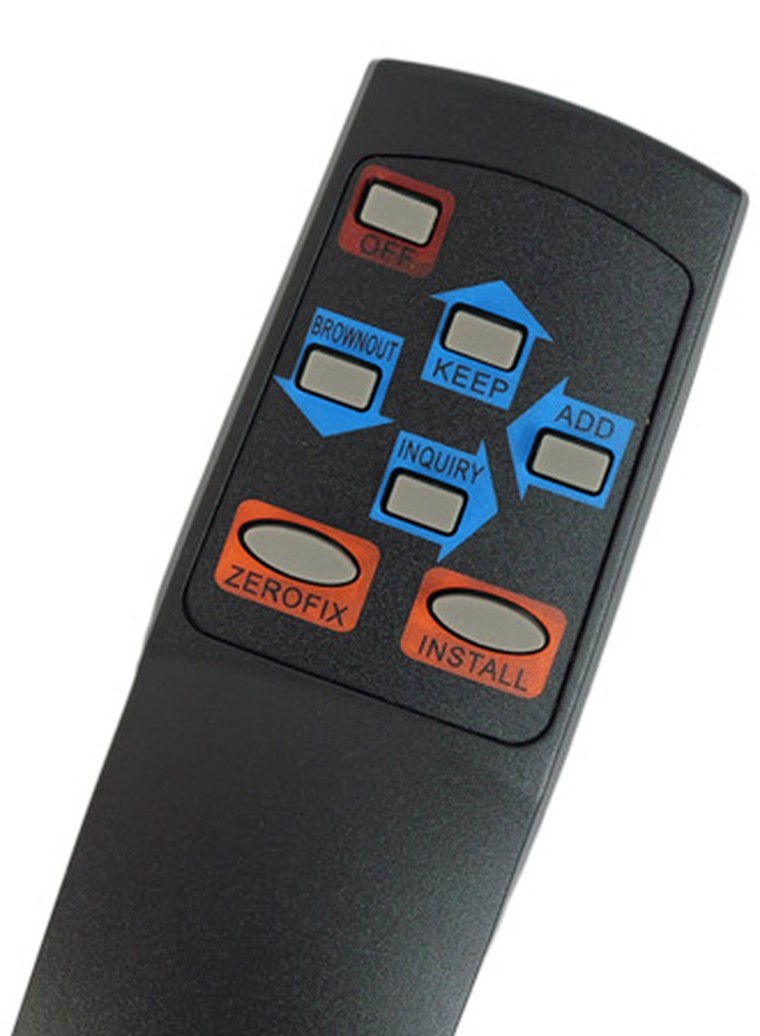
| Key | Function |
|---|---|
| OFF | Switches the scale on and off |
| KEEP | A short press holds the reading |
| BROWNOUT | Power saving — a short press adjusts the display brightness |
| ADD | Adds up several weighings |
| INQUIRY | Recalls the last 10 weighings |
| ZEROFIX | Zeroes the scale |
| INSTALL | A short press changes the unit between kg, lb and N |
The totals from ADD and the history behind INQUIRY are cleared automatically when the scale is switched off.
Batteries
The scale runs on four 1.5 V AA batteries; a set for the scale and the remote comes in the box. When they run low the display shows -LO-. Switch the scale off and replace the batteries.
If you will not be using the scale for a longer period, take the batteries out — leaving them in shortens their life.
Safety and inspections
- The scale is designed with a safety margin, but never exceed its rated capacity of 1500 kg in use.
- Every three months check the lifting rings, the hook and the other parts, along with the split pins and bolts, for looseness, deformation, cracks and similar damage. If you find anything wrong, stop using the scale immediately and contact service for maintenance or replacement of the parts.
- After use, leave the hook hanging vertically. Anything else can easily damage the load cell.
- Keep the scale away from corrosive gases.
- Do not stand under a suspended load — read the weight with the remote, from a safe position.
Frequently asked questions
What is the maximum load capacity of the wagPRO-H1500?
How far does the remote control work?
Does the scale work without a power cable?
Which weighing units does the scale support?
What is the difference between zeroing and taring on this scale?
How do I add up several weighings?
The display shows -LO- — what does that mean?
How often should the hook and lifting parts be checked?
Files to download
The manual and the datasheet in PDF, in case you need an offline copy. Everything they contain is also on this page.