Hanging hook scale up to 200 kg, wagPRO-H200
GTIN: 5907614662134 · SKU: wagPRO-H200
Table of contents
Specifications
- Material: ABS, steel
- Maximum nominal load: 200 kg
- Measurement accuracy: ± 50 g
- Division: 0.1 kg (0.2 lb)
- Maximum permissible load: 100% of the nominal load
- Maximum safety load: 150% of the nominal load
- Display: digital LCD, 1.8"
- Display backlight: yes
- Additional functions: display lock, tare, unit switching
- Available weight units: kg, lb, N
- Power supply: 2 × AAA battery
- Auto power-off: after 1.5 minutes of inactivity
- Operating temperature: 10–60 °C
- Operating humidity: up to 90% at 20 °C
- Device dimensions: 12 × 7.8 × 3.5 cm
- Package dimensions: 24.5 × 12 × 5 cm
- Device weight: 330 g
- Weight with packaging: 440 g
Kit contents
- wagPRO-H200 hanging hook scale
- Mounting ring
- Steel hook
- 2 × AAA battery
- User manual
Panel
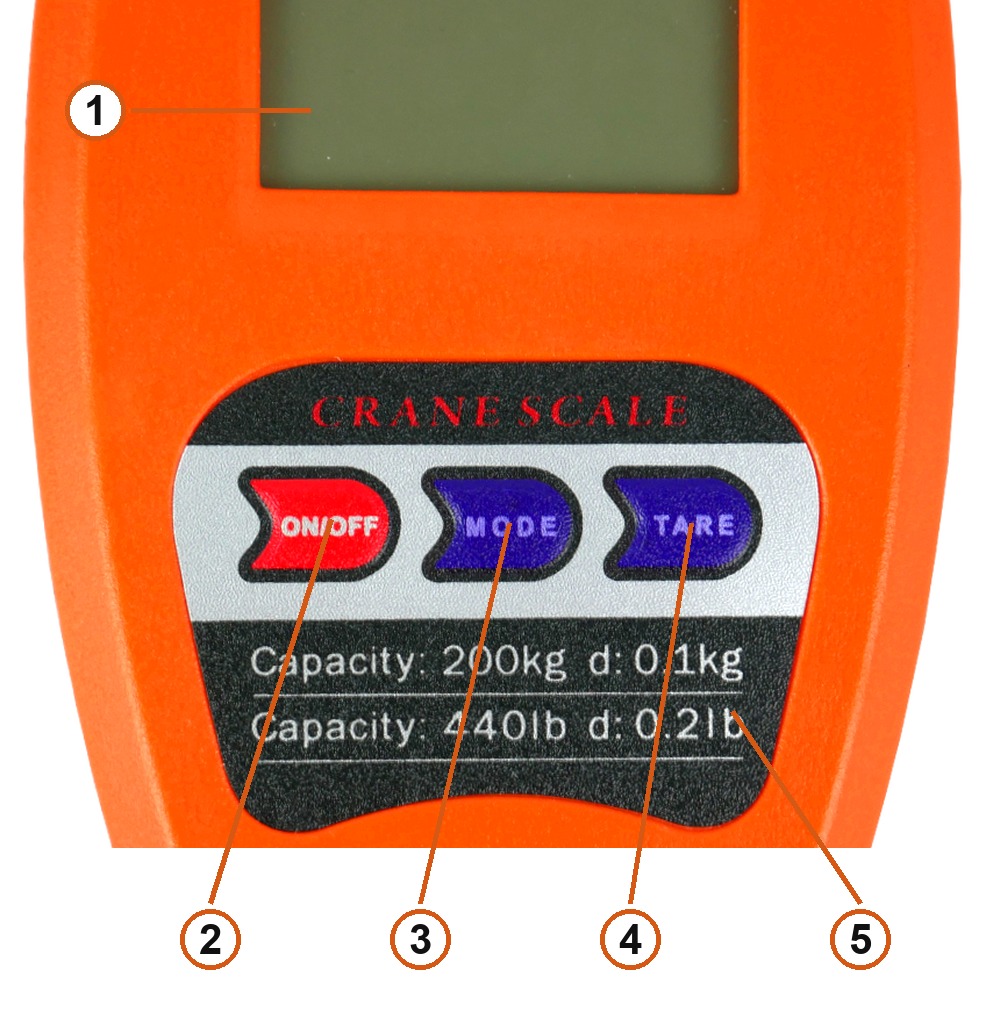
- LCD display — 1.8", backlit.
- ON/OFF — switches the scale on and off.
- MODE — changes the weight unit.
- TARE — tares and zeroes; held down it toggles the automatic display lock.
- Capacity plate —
Capacity: 200 kg d: 0.1 kg/Capacity: 440 lb d: 0.2 lb.
Switching on
Hang the scale by the mounting ring with nothing on the hook and press ON/OFF. When the display shows 0.00 or 0.000, the scale has zeroed itself and is ready to weigh.
Always switch the scale on with no load on the hook, held upright, so the self-test can zero it correctly.
Changing the weight unit
Press MODE to cycle through the available units: kg (kilograms), lb (pounds) and N (newtons). The active unit is shown on the display next to the reading.
Tare function
Use the tare function to weigh goods in a container or a net without counting its weight:
- Hang the empty container on the hook.
- Press TARE briefly — the reading returns to zero.
- Put the goods in the container. Once the reading settles, the display shows the net weight of the goods only.
Automatic display lock
Press and hold TARE with no load on the hook to turn the automatic display lock on or off.
With the lock active the scale freezes the reading by itself as soon as the weight stops changing — useful when the load is still swinging on the hook. To weigh again, take the load off, press TARE and hang the item once more.
Weighing
- Hang the scale by the mounting ring and switch it on with nothing on the hook.
- Wait for
0.00(or0.000) on the display. - Attach the load with the supplied steel hook and wait for it to stop swinging — the display then shows the weight.
- Do not exceed the maximum permissible load. On overload the display shows
O-LdorErr.
Display messages
| Message | Meaning |
|---|---|
O-Ld | Overload — the load exceeds the range. Remove it at once |
Err | Weighing error, usually caused by overload or by a load that will not settle |
LO | Low battery — replace both AAA cells |
Safety
- Keep the scale upright while it runs its self-test.
- Hold the scale only by the mounting ring while weighing — never by the housing. Holding the housing distorts the reading and can damage the scale.
- Avoid strong shocks and vibration during operation.
- When
LOappears, replace the batteries. Never mix used and new cells. - Remove the batteries if the scale will not be used for a long time — a leaking cell can destroy the electronics.
Frequently asked questions
Can the wagPRO-H200 be used for fishing?
What does the tare function do?
How do I switch between kg, lb and N?
How accurate is the scale?
What do O-Ld, Err and LO mean on the display?
Does the scale switch off by itself?
Downloads
Original manufacturer PDF manuals kept available as a legacy reference. Everything from them is already covered on this page — use the PDFs only if you need an offline copy.