Hanging hook scale up to 300 kg, wagPRO-H300
GTIN: 5907614661212 · SKU: wagPRO-H300
Table of contents
Specifications
- Material: steel
- Maximum nominal load: 300 kg
- Measurement accuracy: ± 50 g
- Maximum permissible load: 100% of the nominal load
- Legal-for-trade verification: no
- Display: digital LCD, 0.7"
- Display backlight: blue
- Additional functions: display hold, tare, unit switching
- Available weight units: kg, lb, N
- Power supply: 3 × AA battery
- Battery life: up to 150 hours
- Automatic power-off: after 3 minutes of inactivity
- Operating temperature: 10–40 °C
- Operating humidity: up to 90% at 20 °C
- Device dimensions: 15 × 8 × 4.6 cm
- Package dimensions: 18.5 × 17.5 × 5 cm
- Device weight: 680 g
- Weight with packaging: 800 g
Kit contents
- wagPRO-H300 hanging hook scale
- Steel hook
- Shackle for hanging the scale
- 3 × AA battery
- User manual
Panel
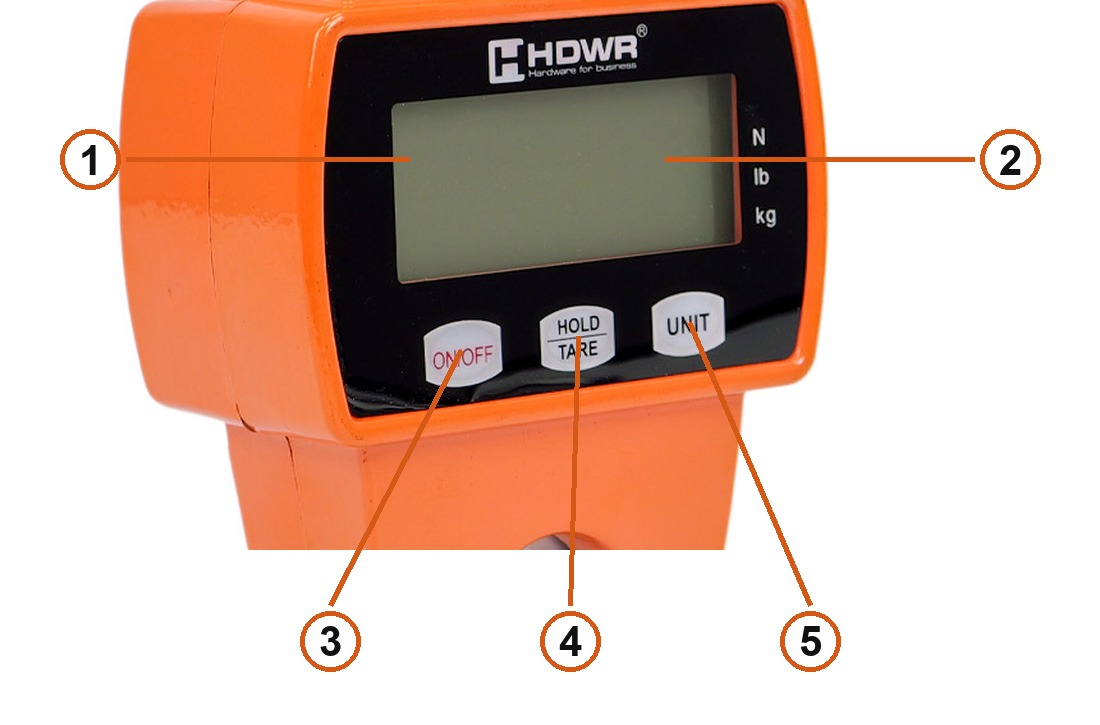
- LCD display — 0.7", with a blue backlight.
- Unit indicators — N, lb and kg; the lit one is the active weighing unit.
- ON/OFF — switches the scale on and off, and stores the current load as tare.
- HOLD/TARE — locks and unlocks the reading on the display.
- UNIT — switches the weighing unit.
Switching on
Hang the scale by the shackle with nothing on the hook and press ON/OFF. The display comes on and the scale zeroes itself automatically. Press ON/OFF again to switch it off.
Always switch the scale on with no load on the hook — that is when it sets its zero point.
Display hold
Press HOLD/TARE to freeze the reading. HOLD appears on the display and the value stays on screen, which is useful when the load is still swinging or you cannot read the display from where you stand.
Press HOLD/TARE again to release it. HOLD disappears and the scale returns to showing the live weight.
Taring
With a load hanging on the hook and its weight shown, press ON/OFF to store that weight as the tare. The reading returns to zero, so you can then weigh only what you add — the contents of a container or a net, without its own weight.
Changing the weight unit
Press UNIT to cycle through the available units: kg (kilograms), lb (pounds) and N (newtons). The active unit is marked by the indicator beside the display.
Weighing
- Hang the scale by the shackle and switch it on with nothing on the hook.
- Attach the load with the supplied steel hook.
- Wait until the load stops swinging — the display then shows a stable weight.
- Use HOLD/TARE if you need to freeze the value before taking the load off.
Never exceed the rated capacity of 300 kg.
Safety
- Never overload the scale — it damages the measuring system and voids the warranty.
- Do not leave heavy items hanging for a long time; it reduces the accuracy and shortens the life of the load cell.
- Always check the condition of the scale and the hook before use.
- Replace flat batteries promptly — take the old cells out of the compartment and fit new ones.
- Do not use the scale in rain, snow or a storm.
- Do not repair the scale yourself. If it fails, contact customer service.
Troubleshooting
| Problem | Cause | What to do |
|---|---|---|
| Nothing on the display although the scale is switched on | Flat battery | Replace the battery |
| Damaged battery | Replace the battery | |
| The key did not register | Hold ON/OFF down longer | |
| No response to HOLD/TARE | The key is dirty or worn | Clean the key and hold it down longer |
| The reading is unstable | The load is moving | Steady the load and the scale |
| The scale is damp | Dry the scale | |
| Dust on the circuit board | Clean the dust out of the housing | |
| The display shows a value other than 0 with no load | The scale was not reset | Reset it with ON/OFF |
| The scale was overloaded or loaded too long | Leave it hanging unloaded for a while | |
| The reading is far off | The scale was not reset | Reset it with ON/OFF |
| The scale needs calibrating | Have it calibrated again | |
| Wrong unit | Change the unit with UNIT |
Frequently asked questions
What is the range and accuracy of the wagPRO-H300?
Which weight units does it support?
How do I freeze the reading?
How do I weigh goods in a container?
How long do the batteries last?
The display shows something other than zero with nothing on the hook — what now?
Downloads
Original manufacturer PDF manuals kept available as a legacy reference. Everything from them is already covered on this page — use the PDFs only if you need an offline copy.