Industrial hook scale up to 5 tonnes, wagPRO-H5000
GTIN: 5907614661649 · SKU: wagPRO-H5000
Table of contents
Specifications
- Material: steel
- Maximum nominal load: 5000 kg
- Measurement accuracy: ± 2000 g
- Maximum permissible load: 100% of nominal load
- Maximum safety load: 120% of nominal load
- Legal-for-trade verification: no
- Display: digital, up to 5 digits
- Display backlight: red
- Additional functions: display hold, tare, unit switching
- Available weighing units: kg, t
- Battery type: lead-acid
- Power supply: mains and built-in battery
- Battery capacity: 5000 mAh
- Battery life: up to 4 days
- Standby time: up to 2 weeks
- Automatic power-off: adjustable, up to 60 minutes of inactivity
- Operating temperature: 10–40 °C
- Operating humidity: up to 90% at 20 °C
- Device dimensions: 21.8 × 13.5 × 51.5 cm
- Package dimensions: 34 × 27 × 38 cm
- Device weight with the hook fittings: 13 kg
- Weight with packaging: 14.7 kg
Kit contents
- Hook scale
- Hook fitting with a safety latch and a mounting pin
- 230 V mains adapter
- Remote control
- User manual
Panel
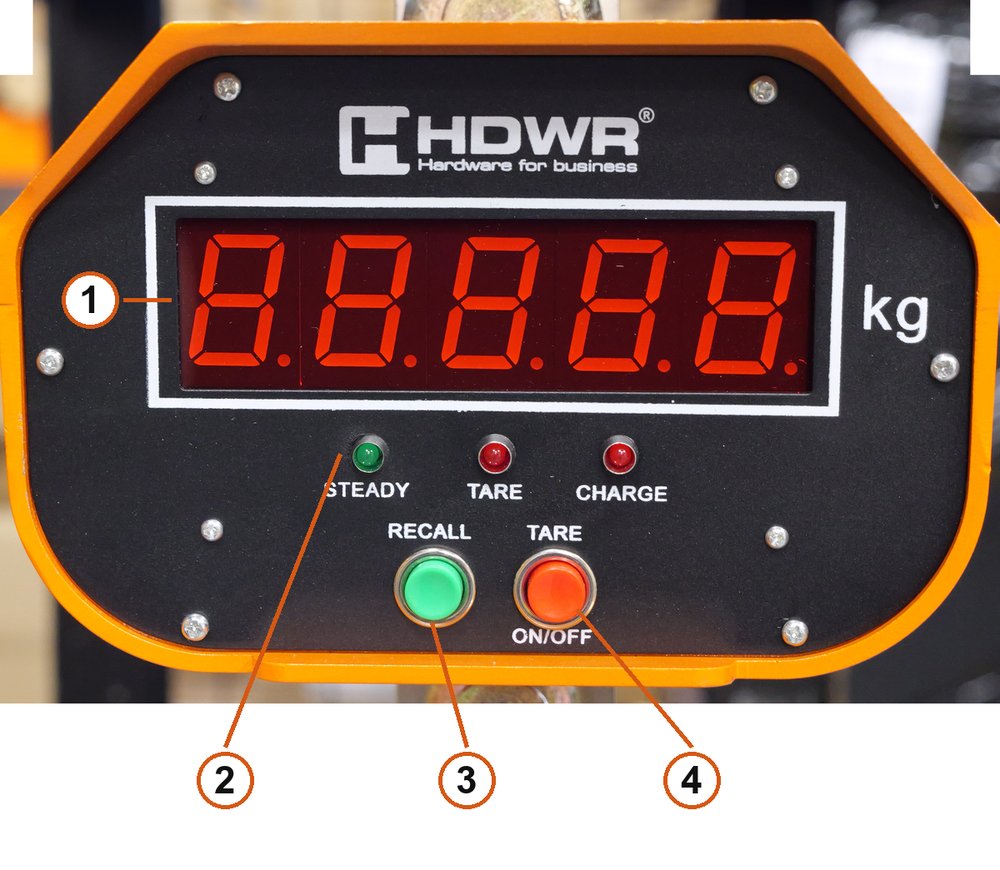
- Display — 5 digits with a red backlight and the weighing unit.
- Indicator lights — STEADY (stable reading), TARE (tare active), CHARGE (charging).
- RECALL button.
- TARE / ON-OFF button.
Remote control
All four weighing functions are operated from the remote supplied with the scale.
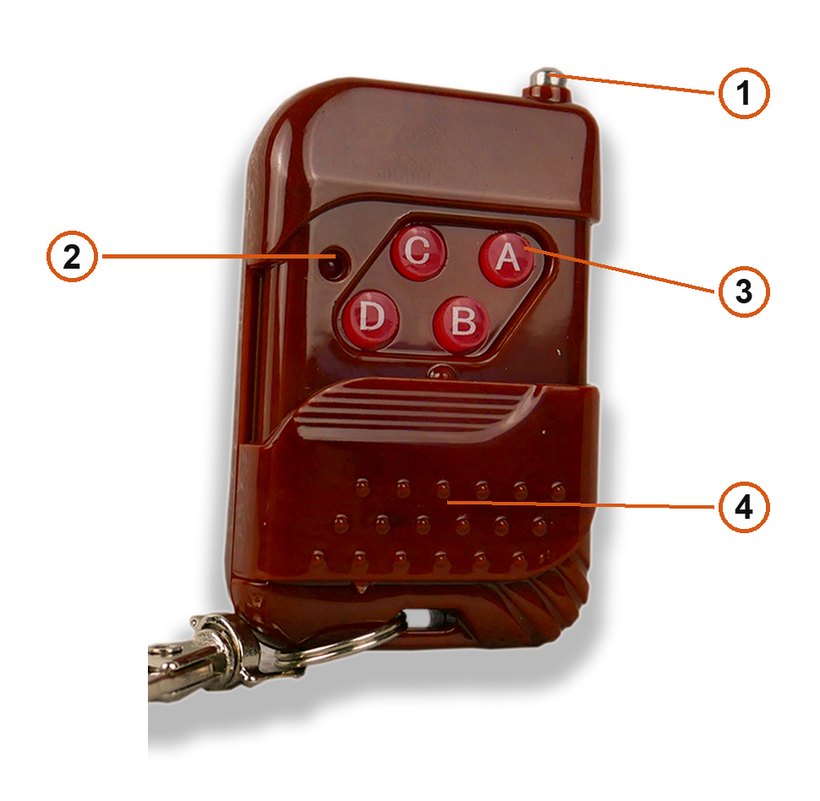
- Antenna — retracted in the photo.
- Indicator light.
- Keys A, B, C and D.
- Sliding key cover.
| Key | Function |
|---|---|
| A | On/Off — switch the scale on and off |
| B | Hold — lock the reading |
| C | Accumulate — add up weighings |
| D | Tare/Zero — tare and zero |
The remote works reliably up to about 40 m, depending on line of sight and local radio conditions.
What each key does
| Action | While weighing | In the menu |
|---|---|---|
| Short press On/Off | Switch the scale on / off | Leave the menu |
| Short press Hold | Lock or unlock the reading | Move to the parameter above, or add 1 to the blinking digit |
| Short press Accumulate | Add up the weighed values | Move to the parameter below, or select the digit to the right |
| Short press Tare/Zero | Tare or zero the weighed value | Confirm the selected parameter or the entered value |
| Long press On/Off | Start calibration | — |
| Long press Hold | Pair the remote | — |
| Long press Accumulate | Cancel and delete the accumulated data | — |
| Long press Tare/Zero | Tare or return to zero with a delay | — |
Pairing the remote
- Press and hold Hold until
-A-appears on the display. - Press and hold key A on the remote when
-a-is shown. - Press and hold key B on the remote when
-b-is shown. - Press and hold key C on the remote when
-c-is shown. - Press and hold key D on the remote when
-d-is shown.
When End appears, pairing is finished and the scale can be operated with keys A/B/C/D.
Using the scale
Switching on and off
- Press On/Off briefly to switch the scale on.
- Press On/Off briefly until
oFFappears to switch it off.
At start-up the display shows, in order, the firmware version (for example A0.8.01), the battery voltage (for example U=6.80), the rated capacity (for example 3000) and the division value (for example 1, meaning 1 kg steps).
If the load on the hook is below 20% of the rated load, the display shows 0, meaning zero weight. If it does not, the system sets zero outside the range and the display shows the actual weight of the item.
Zeroing and tare
Manual tare / zero. Hang the item on the scale and press Tare/Zero briefly once the reading is stable. If the weight is below 2% of the maximum range, the reading changes to zero automatically and the tare light goes out. If it is above 2%, the system completes the tare, the tare light stays on and the zero light goes out.
Automatic tare / zero after 9 seconds. Press and hold Tare/Zero for 3 seconds until tAr-9 appears, then release. The display counts down tAr-x second by second. Hang the item, and the scale tares or zeroes itself the moment tAr-0 appears. If the reading is not stable the display shows —; once it settles, the display returns to zero automatically.
Accumulating weighings
With a weight greater than 0 on the hook, press Accumulate briefly to add the current reading to the total. The display first shows -x- (where x is the number of accumulated weighings), then the sum, and the accumulate indicator lights up.
Press and hold Accumulate to delete the accumulated values; the accumulate indicator goes out.
Locking the reading (Hold)
- Press Hold briefly to lock the display on the current weight. The Hold indicator lights up.
- Press Hold briefly again to release the lock. The Hold indicator goes out.
Calibration
- Before calibrating, make sure the scale is not exposed to anything that could disturb it — wind, vibration, magnets and similar.
- Prepare a reference weight.
- Press and hold On/Off until
CALappears. - When a blinking
0.0appears, calibrate the zero value. Make sure nothing is hanging on the scale, then press Tare/Zero — the system moves on to the next step by itself. - When a blinking uncalibrated weight value appears, that value needs to be calibrated. Make sure the correct weight is on the hook and press Tare/Zero; the system saves the data and finishes the calibration.
If the scale shows No, the weight is too small or the load cell is out of adjustment.
To correct the calibrated weight value, press Hold or Accumulate to enter verification mode. Accumulate moves to the next blinking digit and Hold changes it. Press Tare/Zero to confirm.
Parameter settings (F0–F9)
- With the scale switched off, press and hold Tare/Zero, then press and hold On/Off until
SEtuPappears. - In settings mode press Hold to move to the next parameter, Accumulate to go back to the previous one, and Tare/Zero to enter it.
- Inside a parameter press Hold or Accumulate to change the value, then Tare/Zero to confirm.
| Menu code | Function | Options |
|---|---|---|
F0.codE | Check the internal code | — |
F1.bps | Data transmission speed | 0=1200, 1=2400, 2=4800, 3=9600 |
F2.UAr | Communication format | 0=dJ, 1=dH.1, 2=dH.2, 3=dH.3, 4=db, 5=yZH, 6=yS, 7=JC.1, 8=JC.2, 9=yH, A=LAE, b=HP, C=FSy, d=HP.1, E=JC.3, F=yS.1 |
F3.ASt | Zero tracking | 0.25d / 0.5d / 1d / 2d / 3d (d = displayed division value) |
F4.CAP | Range / decimal place | Range: 1000, 2000, 3000, 5000, 6000, 10000, 15000, 20000, 30000, 50000, 60000. Decimal place: 0 / 0.0 / 0.00 / 0.000 / 0.0000 |
F5.Inc | Displayed division value | d=1 |
F6.Uni | Displayed unit | kilograms (kg) or tonnes (t) |
F7.CLr | Remote pairing | 10-second countdown, clears all matched codes and remote links |
F8.LEd | Automatic power saving | oFF — off, Auto — on |
F9.oFF | Automatic power-off | 0 / 15 / 20 / 30 / 40 / 50 / 60 minutes (0 disables automatic power-off) |
The communication formats in F2.UAr marked as continuous send data all the time; JC.1, JC.2, HP, LAE and similar send once when the reading is stable, and HP.1 and JC.3 send once on a key press.
Serial commands
| No. | Command (hexadecimal) | Function | Parameter |
|---|---|---|---|
| 1 | 01 57 30 0D | Read the weight value | None (has no meaning in the continuous communication format) |
| 2 | 01 25 EF 0D | Tare | None |
| 3 | 01 25 FF 0D | Zero | None |
| 4 | 01 30 30 30 30 30 30 30 AA 0D | Set zero (for calibration) | 30 30 30 30 30 30 30 |
| 5 | 01 3x 3x 3x 3x 3x 3x 3x AA 0D | Calibration (the underlined part is the designated weight) | 3x 3x 3x 3x 3x 3x 3x |
Examples. To load a weight of 001234.5 kg for calibration the command is 01 30 30 31 32 33 34 45 AA 0D. To load 001000.0 kg the command is 01 30 30 31 30 30 30 30 AA 0D.
Recommended calibration method
- Remove the weighed items from the hook fitting and send the zeroing (calibration) command code.
- Load the scale with a known weight. Send the calibration command code once the weight reading is stable.
The command code has a 10-byte format, as shown in the table above. If the calibration weight is too light it can cause the calibration to fail or the weight value to be inaccurate. Use a weight heavier than 1/3 of the range for calibration.
Continuous transmission format
Each data frame consists of 18 hexadecimal codes:
- a 2-digit status code,
- a 1-digit separator,
- a 2-digit gross/net weight code,
- a 1-digit separator,
- a 1-digit weight polarity code,
- a 7-digit weight value,
- a 2-digit unit code,
- a 1-digit end of line,
- a 1-digit line break.
Example. A net weight of 1234.5 kg under stable conditions is sent as ST,NT,+01234.5kg — the 18 hexadecimal codes are 53 54 2C 4E 54 2C 2B 30 31 32 33 34 2E 35 6B 67 0D 0A.
| Digit position | Example | Description |
|---|---|---|
| 1–2 | ST | 2-digit status code: OL — the weight is out of range, ST — the reading is stable, US — the reading is unstable |
| 3 | , | 1-digit separator |
| 4–5 | NT | 2-digit gross/net weight code: GS — the last weight is a gross weight, NT — the last weight is a net weight |
| 6 | , | 1-digit separator |
| 7 | + | 1-digit weight polarity code: + — positive, − — negative |
| 8–14 | 01234.5 | 7-digit weight code |
| 15–16 | kg | 2-digit unit code |
| 17 | 0D | 1-digit end of line |
| 18 | 0A | 1-digit line break |
Frequently asked questions
Is the wagPRO-H5000 certified for commercial trade?
What is the minimum and maximum load?
How far does the remote control reach?
How long does the battery last on a single charge?
How do I pair the remote with the scale?
How do I add up several lifts into one total?
What weight should I use for calibration?
Can I switch the display from kilograms to tonnes?
Downloads
Original manufacturer PDF manuals kept available as a legacy reference. Everything from them is already covered on this page — use the PDFs only if you need an offline copy.