Kitchen scale up to 5 kg with 0.1 g resolution, wagPRO-K5B
GTIN: 5907614667290 · SKU: wagPRO-K5B
Table of contents
Specifications
- Material: ABS
- Maximum load: 5 kg
- Measurement accuracy: 0.1 g
- Legal-for-trade verification: no
- Display: 0.6" LCD
- Additional functions: tare, unit switching, automatic switch-off, low battery indicator
- Available weighing units: g, oz, ml, ct, kg
- Power supply: 2 × 1.5 V AAA battery
- Operating temperature: 0–40 °C
- Storage temperature: −20 to 60 °C
- Operating humidity: 0 to 95%
- Storage humidity: 0 to 95%
- Device dimensions: 21 × 14.5 × 2 cm
- Package dimensions: 21.5 × 17.5 × 3.5 cm
- Device weight: 370 g
- Weight with packaging: 460 g
Kit contents
- Kitchen scale
- 2 × AAA battery
- User manual
Control panel
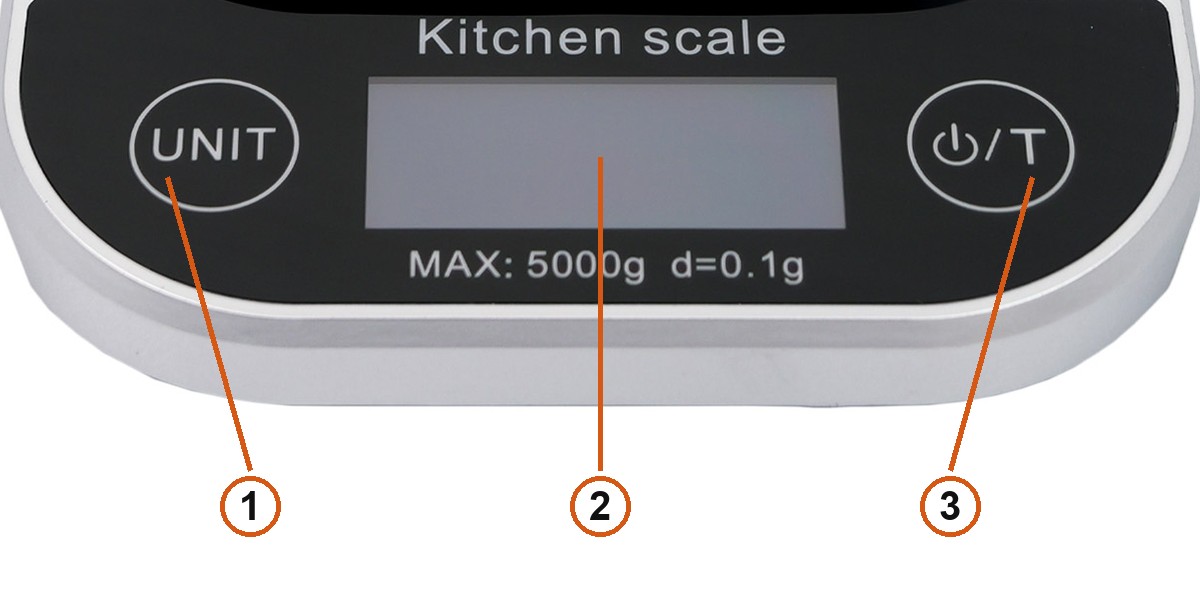
- UNIT — switches the weighing unit.
- LCD display — shows the weight and the active unit. Printed underneath is the range of the scale:
MAX: 5000g d=0.1g. - ⏻ / T — switches the scale on and off, and tares it.
The scale has two buttons, one on each side of the display.
Before first use
Fit the two AAA batteries supplied with the scale into the compartment on the underside. The low battery indicator on the display tells you when they need replacing.
Using the scale
Switching on and weighing
- Put the scale on a hard, level surface — this is what precision at 0.1 g depends on.
- Press ⏻ / T. The scale zeroes itself within about 3 seconds.
- Place what you are weighing on the platform and read the weight off the display.
Taring
Taring lets you weigh ingredients without the weight of the bowl or container:
- Put the empty container on the platform and wait for the reading to settle.
- Press ⏻ / T. The display returns to zero and the weight of the container is subtracted.
- Add the ingredient — the display now shows its net weight.
You can tare several times in a row to weigh a number of ingredients into the same bowl.
Switching the unit
Press UNIT to move through the available units: grams (g), ounces (oz), millilitres (ml), carats (ct) and kilograms (kg). The active unit is shown next to the reading.
The millilitre reading assumes the density of water, so it is accurate for water and for liquids close to it, such as milk.
Overload
If you load more than 5 kg, the display shows EEEE. Take the load off immediately — leaving it there strains the weighing mechanism.
Automatic switch-off
The scale switches itself off after a period without use, which saves the batteries. Press ⏻ / T to switch it back on.
Safety and care
- Put the scale on a hard, level surface. This gives you both the best accuracy and repeatable readings.
- Wipe the scale with a damp cloth and do not let water get inside it.
- Do not use chemical or abrasive cleaning agents.
- Never soak the scale — water will damage the electronics.
- Do not store the scale standing on its edge; that keeps a button pressed and drains the batteries.
- Take the batteries out if you will not be using the scale for a longer period.
- Handle the scale with care. It is a precision instrument.
Frequently asked questions
How precise is the wagPRO-K5B?
How does the taring function work?
Which measurement units does the wagPRO-K5B support?
How many buttons does the scale have and what do they do?
The display shows EEEE — what does that mean?
What batteries does the scale take?
Can I weigh liquids in millilitres?
Why is the reading unstable or does it differ between weighings?
Files to download
The manual and the datasheet in PDF, in case you need an offline copy. Everything they contain is also on this page.