Platform scale up to 500 kg, wagPRO-P500
GTIN: 5907614662103 · SKU: wagPRO-P500
Table of contents
Specifications
- Material: steel
- Maximum nominal load: 500 kg
- Accuracy: ± 200 g
- Maximum permissible load: 100% of nominal load
- Legal-for-trade verification: no
- Display: digital, up to 5 digits
- Display backlight: green
- Additional functions: tare, unit price entry, display backlight
- Battery type: lead-acid
- Power supply: mains and built-in battery
- Battery capacity: 4 Ah (4000 mAh)
- Battery life: up to 2 days
- Standby time: up to a week
- Automatic backlight off: after 3 seconds of inactivity
- Operating temperature: 0–40 °C
- Operating humidity: up to 85% at 20 °C
- Device dimensions: 75 (L) × 45 (W) × 88 (H) cm
- Weighing platform dimensions: 60 × 45 cm
- Packaging dimensions: 86.5 × 46 × 18.5 cm
- Device weight: 11.6 kg
- Weight with packaging: 12.9 kg
Kit contents
- Platform scale
- Mains adapter
- User manual
Assembly and installation
- Take the platform, the stainless-steel frame and the control panel out of the packaging. Remove all protective foam and film, and put the scale on a flat surface.
- Stand the control panel column up and secure it with the catch at the base of the frame.
- Level the scale with its four feet.
- Route the power cable through the cut-out and the securing hole, then fasten the control panel to the column with the four screws.
The column folds down flat against the platform, so the scale can be stored and carried in a fraction of the space.
Control panel
The head has three display windows — the weight, the unit price and the total price — and a keypad next to them:
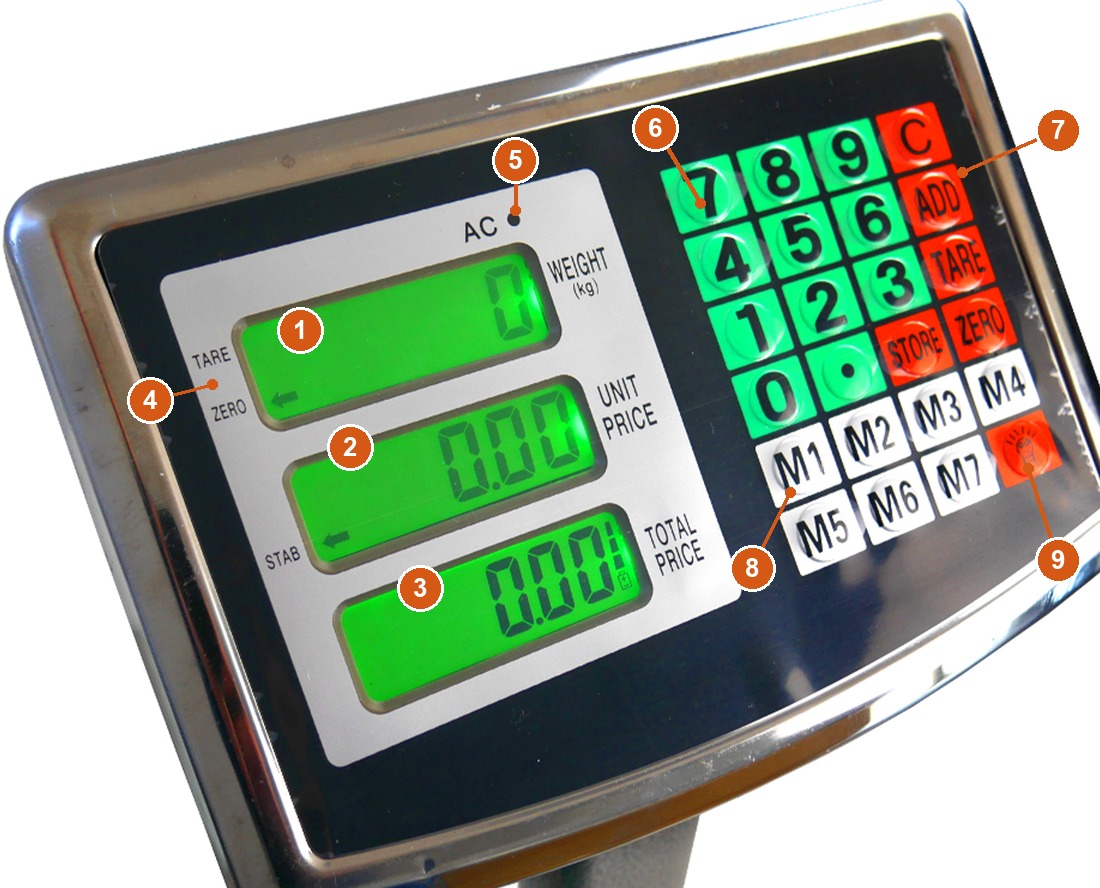
- WEIGHT (kg) window — the weight of the goods on the platform, up to 5 digits.
- UNIT PRICE window — the price per kilogram.
- TOTAL PRICE window — the total price of the weighed goods.
- TARE, ZERO and STAB indicators — the arrow shows whether tare is active, whether the scale is zeroed and whether the reading has settled.
- AC indicator — lit while the scale is connected to the mains.
- [0]–[9] and [.] keys — enter the unit price.
- [C], ADD, TARE, ZERO and STORE — clear the price, add the item to the total, tare, zero the scale and store a price in memory.
- M1–M7 — seven memory slots for unit prices.
- Backlight key (bulb symbol) — turns the display backlight on and off.
Using the scale
Switching on
Make sure the scale stands on a flat, stable surface, then switch it on. The ZERO and STAB indicators light up — wait until both of them are shown before you weigh anything.
Backlight
Press the backlight key to turn the LCD backlight on, and press it again to turn it off. If nothing is placed on the platform after the scale is switched on, the backlight goes out by itself within 3 seconds; it comes back on as soon as the scale detects a load on the platform.
Zeroing
ZERO resets the weight window to zero, up to a maximum of 2% of the safe load.
While the tare function is active, ZERO is unavailable.
Tare
To weigh goods without the weight of the container:
- Put the container on the platform and press TARE. The TARE indicator appears and the weight window shows
0. - Add the goods — the window now shows their net weight.
To switch tare off, take everything off the platform. The display shows a negative value; press TARE again. The arrow moves to ZERO and the weight window shows 0, which means tare is off.
Entering the unit price
Use the numeric keys [0]–[9] to enter the price per kilogram of the weighed goods, and [.] for the decimal part. [C] clears what you have entered.
Totalling with ADD
ADD adds up the prices and weights of individual items:
- Put the goods on the platform — the weight appears in the WEIGHT window.
- Enter the unit price (per 1 kg) on the numeric keys. The first price appears in the TOTAL PRICE window.
- Press ADD — the price is stored in the scale's memory.
- Take the goods off the platform before you continue; otherwise the prices will not add up.
- Put the next item on the platform, enter its price per kilogram and press ADD again. The TOTAL PRICE window now shows the sum of everything entered so far.
You can repeat this up to 99 items in one cycle. Press [C] to leave totalling.
Price memory (M1–M7 and STORE)
To store a unit price:
- Press STORE — the UNIT PRICE window shows
o. - Enter the unit price you want to save.
- Press one of the M1–M7 keys. The price is now stored under that key.
To use a stored price, put the goods on the platform and press the matching M key — the scale shows the unit price and the total price for that item.
Battery and charging
Recharge the battery after use, as soon as Lo.b appears in the unit price window. Under normal conditions the scale needs at least 1.5 hours of charging for every hour of use. If the scale is not used for a longer period, and after every 3 months of operation, connect it to the mains for 24 hours without a break — otherwise the battery can be damaged.
Troubleshooting
| Problem | Cause | What to do |
|---|---|---|
| The AC indicator does not light up | The power cable may be disconnected | Check that the mains plug and the cable are properly connected; replace the fuse if it is blown |
| The reading is not stable | Insufficient supply voltage, damp, or an uneven floor | Check that the scale stands level, charge the battery, and reduce the humidity around the scale |
| The scale shows a message and switches itself off | No voltage in the circuit — the battery is flat | Charge the battery; if that does not help, contact service |
| The scale does not work on battery power | The battery is damaged or flat, or its connection is faulty | Connect the scale to the mains, check the connection between the weighing unit and the control panel, and contact service if the fault persists |
Safety
- Keep the scale clean. Do not expose it to direct sunlight, very high or very low temperatures, heavy dust or strong shocks.
- Do not drop heavy objects onto the weighing platform — that damages the measuring assembly.
- If the capacity is exceeded, a message appears on the display. Take the load off immediately.
- The scale needs a stable supply voltage. Voltage that is too high or too low causes malfunctions.
- Disconnect the adapter from the mains if the scale is not used for a longer period.
- Before cleaning, switch the scale off and disconnect it from the mains, then wipe it with a damp cloth. Never use water to clean the scale — it causes short circuits and risk of electric shock.
- Keep the scale clean and dry at all times.
Frequently asked questions
How much can the wagPRO-P500 weigh and how accurate is it?
Does the wagPRO-P500 work without mains power?
How do I weigh goods without the weight of the container?
How do I add up several items into one total?
How do I save a price I use often?
The display shows Lo.b — what does that mean?
Why is the reading unstable?
Can the scale be folded for storage?
Downloads
PDF versions of the manual and the data sheet, if you need an offline copy. Everything they contain is already on this page.