Electronic shop scale up to 30 kg, wagPRO-S30
GTIN: 5907614664770 · SKU: wagPRO-S30
Table of contents
Specifications
- Material: steel, plastic
- Maximum nominal load: 30 kg
- Accuracy: ± 1 g
- Maximum permissible load: 100% of nominal load
- Legal-for-trade verification: no
- Display: digital, up to 5 digits
- Automatic backlight off: after 10 seconds of inactivity
- Additional functions: tare, piece counting, display backlight, automatic switch-off
- Battery type: lead-acid
- Power supply: mains and built-in battery
- Battery capacity: 4 Ah (4000 mAh)
- Battery life: up to 2 days
- Standby time: up to a week
- Operating temperature: −10 to 40 °C
- Storage temperature: −25 to 50 °C
- Operating humidity: up to 90%
- Device dimensions: 30 (L) × 27 (W) × 11 (H) cm
- Weighing platform dimensions: 26 × 22 cm
- Device weight: 3 kg
- Weight with packaging: 3.4 kg
Kit contents
- Shop scale
- Mains adapter
- User manual
Control panel
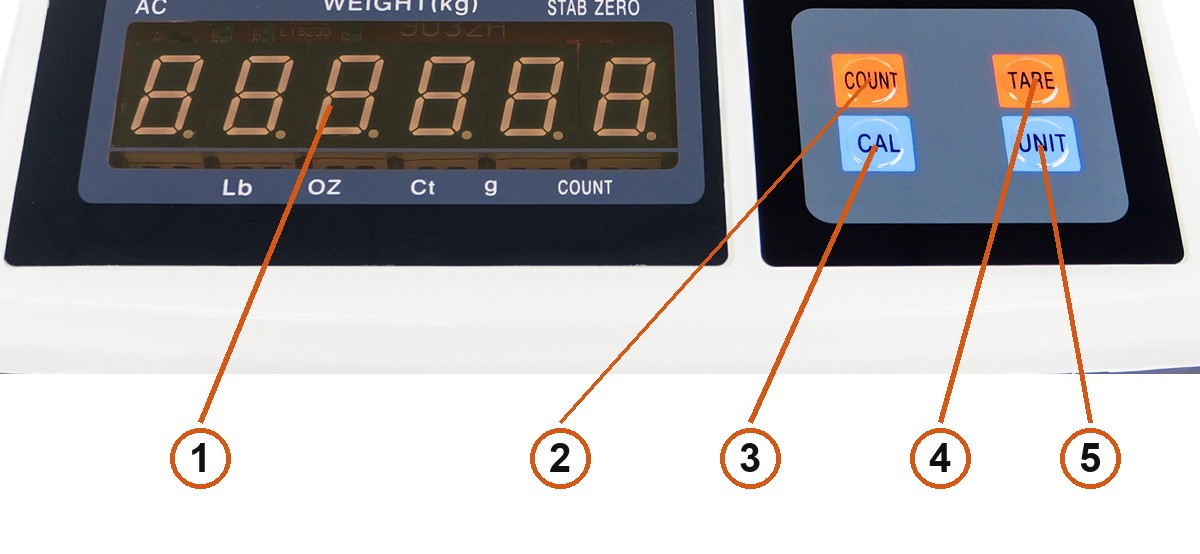
- Display — up to 5 digits, with the unit and status indicators around it.
- COUNT — piece counting.
- CAL — calibration only. Held for more than 3 seconds it enters calibration.
- TARE — returns the scale to zero while weighing, and confirms values in counting and calibration.
- UNIT — switches the weighing unit.
Display indicators
The display carries fixed labels around the digits:
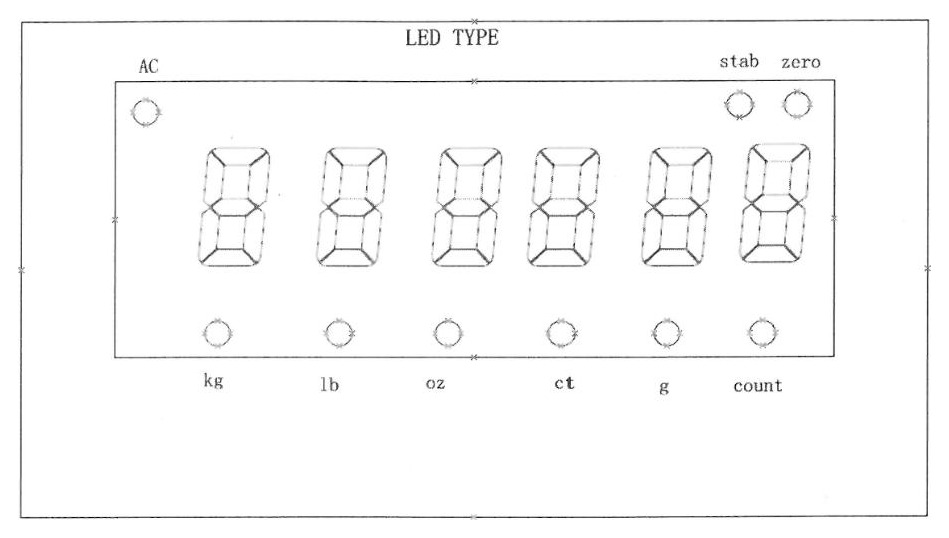
| Indicator | Meaning |
|---|---|
| AC | Running from the mains adapter |
| stab | The reading is stable |
| zero | The reading is zero |
| kg, lb, oz, ct, g | The active weighing unit |
| count | The scale is in counting mode |
Using the scale
Taring
While weighing, press TARE to subtract the current load and return the windows to zero. The zero indicator lights up to confirm.
The tare range is 50% of the full scale by default, so you can tare a container weighing up to about half the capacity.
Switching the unit
Each press of UNIT moves to the next unit and lights the matching indicator. The S30 offers kg, lb, oz, ct and g.
Piece counting
Counting works out the weight of a single item from a sample, then reports how many pieces are on the platform.
Before you start, the scale must read zero — press TARE if it does not.
- Press COUNT. The display shows
-COU-and thenC--20, meaning counting mode with the default sample of 20 pieces. - To use a different sample, press COUNT again to cycle through the available sizes: 20, 30, 50, 80.
- Put exactly that many identical items on the platform and press TARE to weigh the sample. The display shows
C XX— the unit weight has been worked out from the total weight and the number of pieces. - Load any quantity of the same item and the display shows how many pieces it is.
- Press TARE again to leave counting mode.
Calibration
- With the scale switched on, hold CAL for more than 3 seconds. The display shows
-CAL-, then---, waiting for the calibration weight. - Put the weight on the platform and press TARE to confirm.
- Press CAL to select the value of the weight, then TARE to confirm.
- Press CAL to select the maximum capacity, then TARE to confirm.
- Press CAL to select the resolution, then TARE to confirm.
- Press CAL to select the decimal point position, then TARE to confirm.
- The display returns to showing the weight. Calibration is complete.
Error messages
| Message | Meaning |
|---|---|
Err1 | The load cell may be connected incorrectly, or no calibration weight was placed on the platform |
Err2 | Counting was started while the reading was not zero |
Err3 | In counting mode — the sample resolution is too coarse for the item |
Err4 | In counting mode — the displayed weight is negative |
Lb | Low battery. Charge the scale |
Fu | The load exceeds the range, or the piece count is too large for the display |
Battery and charging
The scale runs from the 230 V mains adapter or from its built-in 4 Ah lead-acid battery — up to 2 days of use on a charge, or about a week in standby. Charge it when the low-voltage alarm sounds or Lb appears; leaving the battery flat shortens its life.
Maintenance
- Put the scale on a stable table and level it with the four adjustable feet.
- Do not use the scale in a harsh environment.
- Use a separate mains socket to avoid interference from other electrical equipment.
- Do not leave anything on the platform before switching the scale on.
- Charge the battery promptly when the low-voltage alarm sounds.
- Check the scale regularly, as often as your usage warrants.
- Match the capacity of the scale to what you weigh.
- Check the battery periodically to make sure it still holds a charge.
Frequently asked questions
Is the wagPRO-S30 certified for commercial trade?
What is the maximum load and accuracy?
How long does the battery last?
What functions are built into the scale?
Which weighing units does the scale support?
How do I count pieces instead of weighing them?
The display shows Err2 — what does that mean?
The display shows Fu — what should I do?
Files to download
The manual and the datasheet in PDF, in case you need an offline copy. Everything they contain is also on this page.